1-Visitor
March 29, 2015
Solved

How to extract non-consecutive submatrix in a easier way

  • March 29, 2015
  • 5 replies
  • 5024 views

Hi, everyone,

If I have a 100 by 100 matrix and I want to extract its 10 to 20, 40 to 50 and 70 to 80 rows and columns,

Is there a easier way rather than submatrix the rows first and then the columns and use stack or augment to assemble the submatrice?


Such as define a index of the rows and columns I want to extract and then extract the index from the matrix in Matlab?

E.g, index= [10:20 40:50 70:80]

K_BC=K(index, index)


Best

Shawn

Best answer by StuartBruff

Shawn Fan wrote:

Hi, everyone,

If I have a 100 by 100 matrix and I want to extract its 10 to 20, 40 to 50 and 70 to 80 rows and columns,

Is there a easier way rather than submatrix the rows first and then the columns and use stack or augment to assemble the submatrice?


Such as define a index of the rows and columns I want to extract and then extract the index from the matrix in Matlab?

E.g, index= [10:20 40:50 70:80]

K_BC=K(index, index)

I'm not sure there's an easy way in Prime (or in Mathcad 15). Improvements to array indexing to allow such things have been on my (submitted) wishlist for a long time. To my mind, the "natural" Mathcad way to do this would be by using a range variable to store ranges of the form "(10..20),(40..50),(70..80)". Whilst Mathcad 15 won't let you assign such a range to a range variable, it will let you enter it as the list of elements in a for loop, so you could just write "for r e (10..20),(40..50),(70..80) <code to extract row r and build the result matrix>", not as neat as Matlab, but it will work. The downside is that you can't pass such a range as an argument to a function or assign it to a range variable.

The even bigger downside to Prime is that you can't even enter such expressions or enter standard ranges as arguments to functions! This prevents several of my Mathcad 15 worksheets from working in Prime.

However, all is not total gloom as it's possible to write a function that will interpret a string like "10:20 40:50 70:80" and explicitly expand the implied range. The Big Black Cloud that accompanies this thin silver lining is that I've got the trial version of Prime 3.1 and you can't read it. I could write a Mathcad 15 version, which you could convert (provided you've got Mathcad 15), but my Prime version takes advantage of Prime's matrix row extraction operator to simplify things and Mathcad 15 only has the equivalent column operator. Unfortunately, I can't create the Mathcad 15 version at the moment.

Stuart

Here's an example of a function pickrows that will interpret a string as a range and pick out the desired rows. R is the matrix of interest. slist is a range that uses "," to separate ranges (as per normal Mathcad usage) and slist2 uses spaces to separate the ranges; both use the colon as per Matlab normal usage).

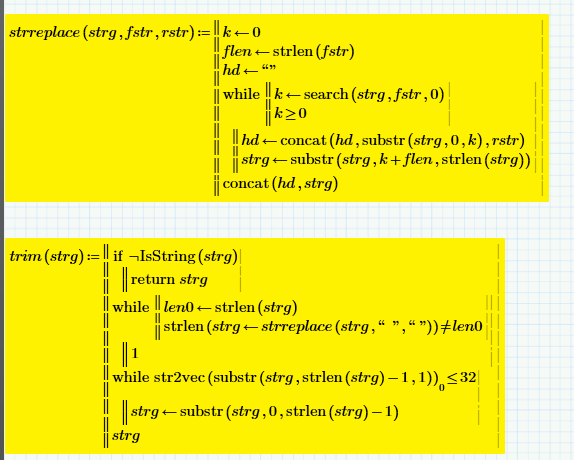
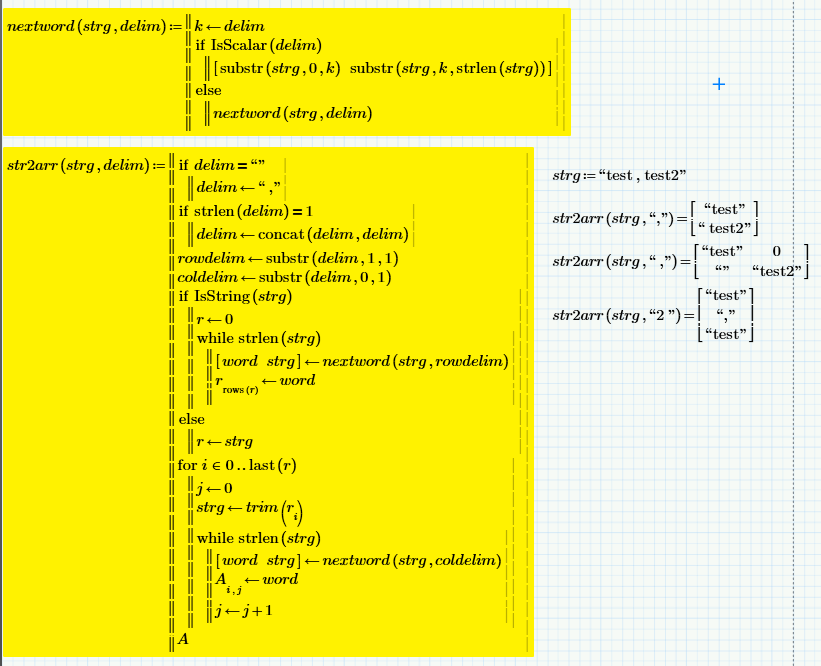
It makes use of my function str2arr that converts a string into an array, using a delimiter string "cr" where c is the column delimiter character and r is the row delimiter character.
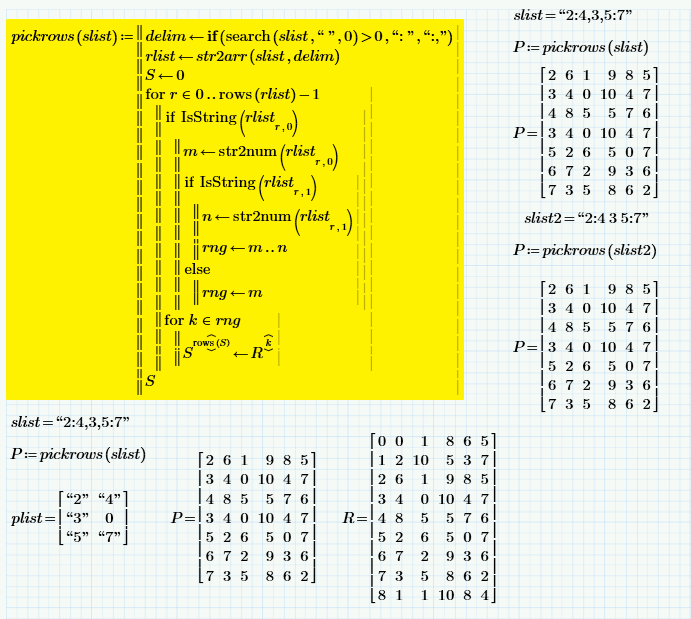
Functions needed to support pickrows ...
5 replies

23-Emerald V
March 30, 2015

Shawn Fan wrote:

Hi, everyone,

If I have a 100 by 100 matrix and I want to extract its 10 to 20, 40 to 50 and 70 to 80 rows and columns,

Is there a easier way rather than submatrix the rows first and then the columns and use stack or augment to assemble the submatrice?


Such as define a index of the rows and columns I want to extract and then extract the index from the matrix in Matlab?

E.g, index= [10:20 40:50 70:80]

K_BC=K(index, index)

I'm not sure there's an easy way in Prime (or in Mathcad 15). Improvements to array indexing to allow such things have been on my (submitted) wishlist for a long time. To my mind, the "natural" Mathcad way to do this would be by using a range variable to store ranges of the form "(10..20),(40..50),(70..80)". Whilst Mathcad 15 won't let you assign such a range to a range variable, it will let you enter it as the list of elements in a for loop, so you could just write "for r e (10..20),(40..50),(70..80) <code to extract row r and build the result matrix>", not as neat as Matlab, but it will work. The downside is that you can't pass such a range as an argument to a function or assign it to a range variable.

The even bigger downside to Prime is that you can't even enter such expressions or enter standard ranges as arguments to functions! This prevents several of my Mathcad 15 worksheets from working in Prime.

However, all is not total gloom as it's possible to write a function that will interpret a string like "10:20 40:50 70:80" and explicitly expand the implied range. The Big Black Cloud that accompanies this thin silver lining is that I've got the trial version of Prime 3.1 and you can't read it. I could write a Mathcad 15 version, which you could convert (provided you've got Mathcad 15), but my Prime version takes advantage of Prime's matrix row extraction operator to simplify things and Mathcad 15 only has the equivalent column operator. Unfortunately, I can't create the Mathcad 15 version at the moment.

Stuart

Here's an example of a function pickrows that will interpret a string as a range and pick out the desired rows. R is the matrix of interest. slist is a range that uses "," to separate ranges (as per normal Mathcad usage) and slist2 uses spaces to separate the ranges; both use the colon as per Matlab normal usage).

It makes use of my function str2arr that converts a string into an array, using a delimiter string "cr" where c is the column delimiter character and r is the row delimiter character.

Functions needed to support pickrows ...

23-Emerald I
March 30, 2015

What am I missing? Isn't this what "submatrix" does?

23-Emerald V
March 30, 2015

Fred Kohlhepp wrote:

What am I missing? Isn't this what "submatrix" does?

Well, yes and no. Submatrix will do the job in part, but then you've got the hassle of stacking the various submatrices back together again ... which the OP wanted to avoid if possible.

Entering the list of rows as a string seemed to be the easiest way to express the list, but a nested array is also a possibility - I've used a row vector format for the simple function below. The new function doesn't require any extra support functions, but, whilst the new matrix entry scheme makes it easier than M15 to enter an array, it's still nowhere near as simple as typing a string. Of course, what's really needed is an extended range notation that would allow the user to directly create the range (1..3),0,(5..7) as used in the example below or (10..20),(40..50),(70..80) as in the OP's original post.

I've been having a quick play with the latest trial version of Prime and, whilst there are indeed many things that are frustratingly absent (like many of the M15 features I use and something called performance), there are a few things that I quite like, the row operator being one of them and the ability to quickly enter new rows / columns into an array ... I've even got the hang of some of the keyboard shortcuts, as the ribbon is another of those frustrations ...

Stuart