1-Visitor
July 28, 2020
Solved

how to find out who causes an error

  • July 28, 2020
  • 2 replies
  • 2831 views

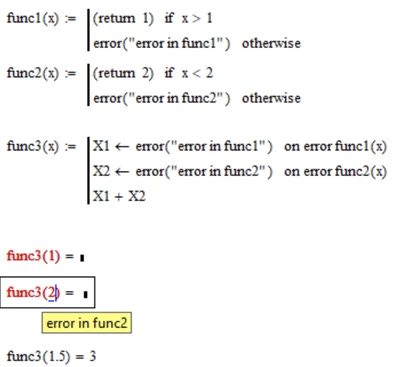
Hi,I use the error message function to inform me about some errors in a few functions. At the same time I use on error operator to get already calculated results in a loop. Without it I can't see what is happening (I can't get already calculated results).

I want to find out which function causes an error without using debug mode. Is it possible?

Simplified example without loop is attached.

Best answer by Werner_E

I guess you'll have to ask in func3 multiple times

Werner_E_0-1595936718150.png


Another option might be that func1 and func2 don't throw an error but return some kind of error code as reault which then can be checked by func3.

2 replies

Werner_E25-Diamond IAnswer
25-Diamond I
July 28, 2020

I guess you'll have to ask in func3 multiple times

Werner_E_0-1595936718150.png


Another option might be that func1 and func2 don't throw an error but return some kind of error code as reault which then can be checked by func3.

ifomenko1-VisitorAuthor
1-Visitor
July 28, 2020

Thank you very much for idea to return error code (string) instead of firing an error. It works well enough.

15-Moonstone
July 29, 2020

Mathcad 15 has a trace command.  This will provide output during the running of a program.  It is helpful in debugging programs.  Prime 6 does not have the command.


Cheers,


David

ifomenko1-VisitorAuthor
1-Visitor
July 29, 2020

Thanks David, but debug mode doesn't give you ability to see long vector or matrix, it does't give you ability to plot already calculated results. If MC meets error it doesn't return anything. That's why I wrote "not using debug mode".