14-Alexandrite
November 11, 2024
Solved

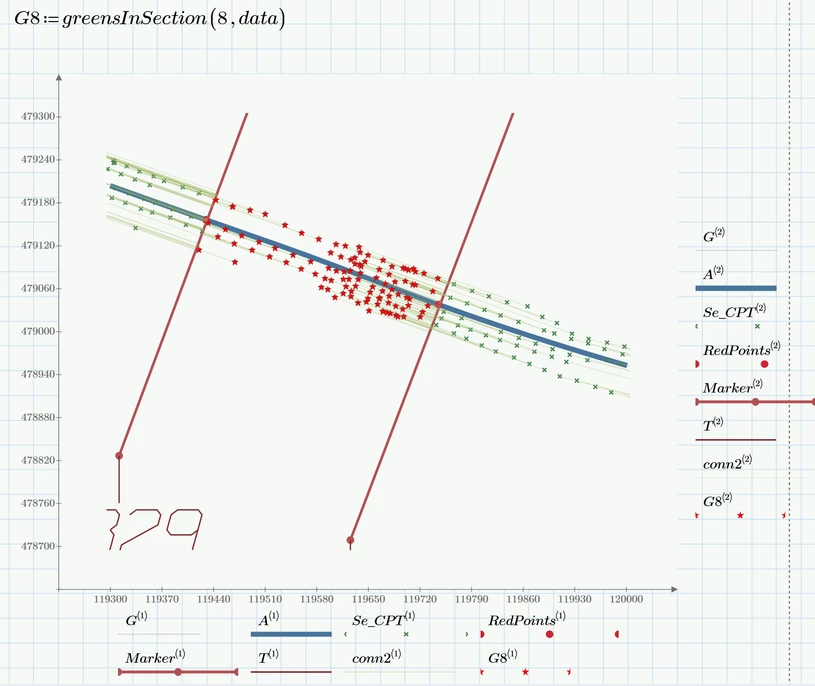
How to find the min distance to find the distance between the red point and all the green points

  • November 11, 2024
  • 2 replies
  • 1836 views

Hi @Werner_E 

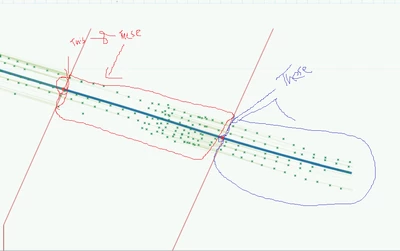
Do you mind showing me how to change this program for the min distance to find the distance between the red point and all the green points come before it regardless the min distance 


YA_10963798_3-1731307031131.png


like ...In the previous topic we found the nearest to the red point ...I need now to change it to find the distance between the red points ana all the greens come before it and the calculation of the distance should be separet for each red point ..that means if we consider to the third red point the target greens will be the ones between the second and the third points only without involving the previous segments 


YA_10963798_4-1731307171370.png


Thanks in advance 


Best answer by Werner_E

I agree with Martin that for every new question you should provide the Prime sheet and also the necessary data file so that all members of the community have the opportunity to take part. The smaller and simplified the sheet, the better!

Furthermore you can't expect us to keep track which file was posted by whom in the past and keep all the files. Being lazy by nature I don't delete the files as regular as I maybe should and so your new files worked even though you did not provide the necessary Excel sheet. But the missing sheet sure would have hindered other members to try to help.


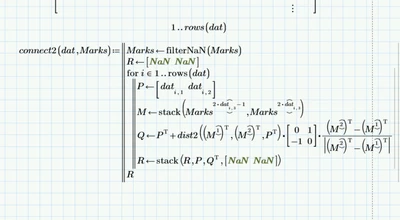
Concerning your new question I don't think that i can help. The function "connect2" you reference is a function which creates the data structure necessary to plot the line segments from every green point to the red LINE nearest to it - that way visually showing hat minimal distance.

The function is called "connect2" because it followed "connect", which would do similar but by connecting each green point and the nearest red point.


I don't see how your new question would relate to that function. Actually I don't understand what that question would be all about.

What should "find the distance between the red point and all the green points come before it regardless the min distance" mean?

How would "before" be defined?

As far we cycled through all green points to find the red line closest to it. Not you want to cycle through the few red points(!?) and find ... what?

Again, as you reference the function "connect2", I have no clue to what you may need.


In case you just want to create a list of all green points within a certain section, we could add the information, if the point is left or right of the red marker line
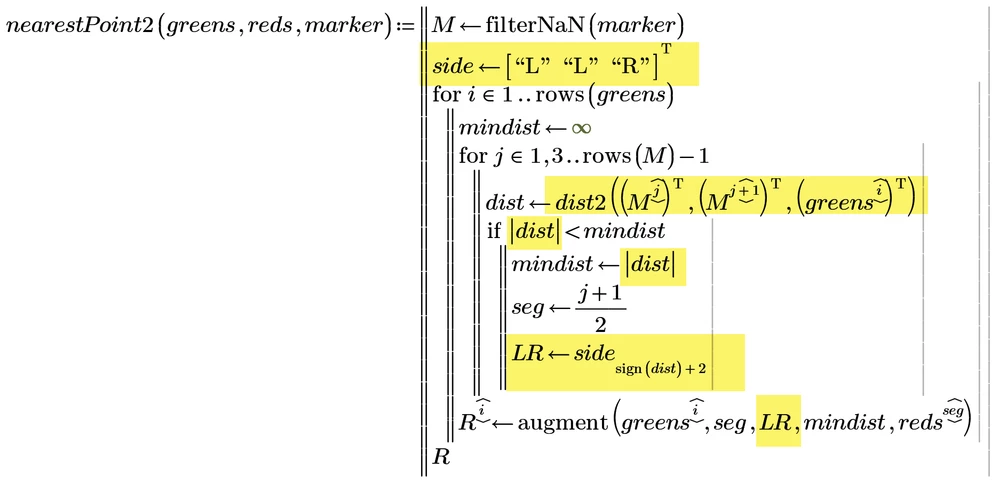
Werner_E_0-1731354015620.png

and use this information to select all points within a section

Werner_E_1-1731354055865.png

Example:

Werner_E_2-1731354082853.png


In the attached P10 file I got rid of all regions not relevant to the question. If you can reduce the sheet further, please do so before you re-up it again. Smaller sheets make life a lot easier!



2 replies

24-Ruby III
November 11, 2024

Hi,

if you are asking for a help, please upload your mcdx file.

Werner_E25-Diamond IAnswer
25-Diamond I
November 11, 2024

I agree with Martin that for every new question you should provide the Prime sheet and also the necessary data file so that all members of the community have the opportunity to take part. The smaller and simplified the sheet, the better!

Furthermore you can't expect us to keep track which file was posted by whom in the past and keep all the files. Being lazy by nature I don't delete the files as regular as I maybe should and so your new files worked even though you did not provide the necessary Excel sheet. But the missing sheet sure would have hindered other members to try to help.


Concerning your new question I don't think that i can help. The function "connect2" you reference is a function which creates the data structure necessary to plot the line segments from every green point to the red LINE nearest to it - that way visually showing hat minimal distance.

The function is called "connect2" because it followed "connect", which would do similar but by connecting each green point and the nearest red point.


I don't see how your new question would relate to that function. Actually I don't understand what that question would be all about.

What should "find the distance between the red point and all the green points come before it regardless the min distance" mean?

How would "before" be defined?

As far we cycled through all green points to find the red line closest to it. Not you want to cycle through the few red points(!?) and find ... what?

Again, as you reference the function "connect2", I have no clue to what you may need.


In case you just want to create a list of all green points within a certain section, we could add the information, if the point is left or right of the red marker line

Werner_E_0-1731354015620.png

and use this information to select all points within a section

Werner_E_1-1731354055865.png

Example:

Werner_E_2-1731354082853.png


In the attached P10 file I got rid of all regions not relevant to the question. If you can reduce the sheet further, please do so before you re-up it again. Smaller sheets make life a lot easier!


14-Alexandrite
November 12, 2024

Hi Werner, 

Actually I tried to write this program depending on your previous solution>> to find the distance between markers and the previous green points 

YA_10963798_0-1731395327616.png


when I say before I mean example : distance between  marker 2 all greens(cpt) (which located in between marker 1 and marker 2 )

dist3 will be ( marker3 and all greens located in marker 2 and 3) 


Do you think what I wrote is correct? >>> I'm asking because I honestly don't know why I used (seg) I just follow your steps

also tried this one:

YA_10963798_0-1731408915236.png


Thank you for your above answer >> that was my next step >> you are always awesome ..and it wasn't me who posted as a new question ..