1-Visitor
August 30, 2025
Solved

how to finish the input for Euler's formula expression

  • August 30, 2025
  • 3 replies
  • 553 views

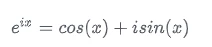
Say, if I want to define the expression of Euler's formula below in Mathcad, how should I finish the input for that?

ZZ_13027099_0-1756561160071.png


Best answer by StuartBruff

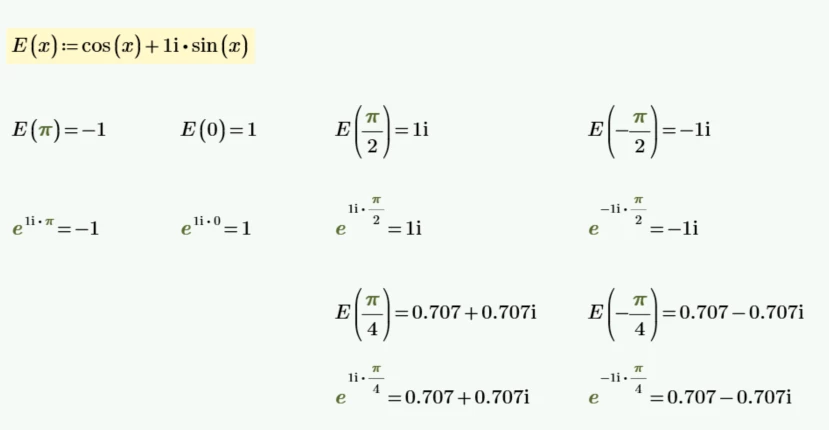
Now I've opened up my laptop ...


2025 08 30 A.png


Stuart

3 replies

25-Diamond I
August 30, 2025

You don't have to define the formula as Mathcad and also Prime are aware of it.

And what do you mean by  "finish the input" ?

Werner_E_0-1756562603536.png


As you see in the picture, the imaginary unit must be input as "1i" (without the quotes and without a multiplication in-between).

Unfortunately in Prime the imaginary unit is also shown that way. That's nicer looking in old Mathcad (here MC15 in the pic)

Werner_E_0-1756562889841.png


23-Emerald V
August 30, 2025

As Werner says, Mathcad is already aware of the relationship - Mathcad numbers are complex by default and many functions are complex-aware.


However, if you wanted to define your own Euler equation, then you can do so as follows:


E(x) := cos(x) + 1i*sin(x)


where x is real.


Euler deserves a capital, and it avoids confusion with the built in exponent function.


Stuart

23-Emerald V
August 30, 2025

Now I've opened up my laptop ...


2025 08 30 A.png


Stuart

1-Visitor
August 31, 2025

Appreciate it a lot, it's so clear to my confusion.