10-Marble
November 5, 2023
Solved

How to get the max value from a plot defined in a function

  • November 5, 2023
  • 2 replies
  • 3560 views

Hello, PTC community,


I defined a function in Mathcad prime 9 for plotting the displacement response (Y-axis) versus time (X-axis). This plot is for a single time period T. 

I want to get the maximum displacement (Y-value) from the graph for each time period T.


For example, I want the maximum displacement values from the plot for Time period T if T= 0.02, 0.2, 4.

eg

T= 0.2        max. displacement: xx

T:0.4          max. displacment xxx and so on.


I attached the mathcad file and it imports a text file containing earthquake data which is also attached for your reference. 


I would really appreciate your help.


Thanks,

Abdur



Best answer by Werner_E

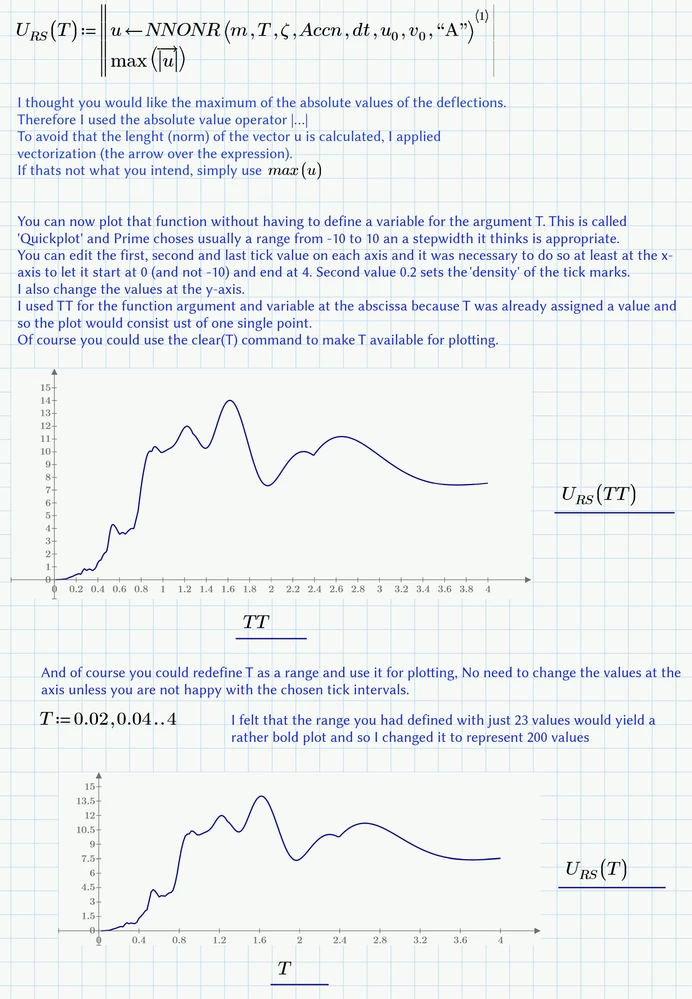
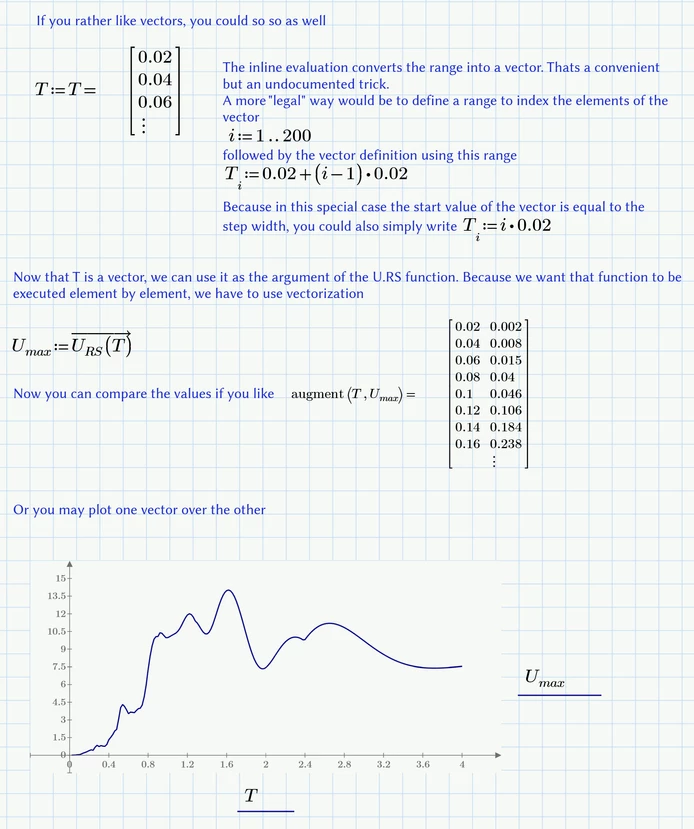
Here are my 2 cents. A simple function should do the job.

Werner_E_0-1699629810180.png

Werner_E_1-1699629882483.png


Prime 9 file attached


2 replies

Community Moderator
November 9, 2023

Hi Abdur_2063,

Thank you for your question. 
I’d like to recommend to bring more details and context to your initial inquiry

It also helps to have screenshot(s) or a short video to better understand what you are trying to do in your process. 

This will increase your chances to receive meaningful help from other Community members. 

Regards,

Community Moderation Team.

10-Marble
November 9, 2023

Thank you very much for responding and helping.


I have been using Mathcad to apply the Newmark method and successfully plotted the displacement versus time for earthquake ground motion. However, I'm facing a challenge in extracting the maximum displacement values for each time period (T=0.02s to 4s in increments of 0.02s) from my plot.


 My goal is to create a new plot with time on the X-axis and the corresponding maximum displacement values on the Y-axis (Response Spectrum Curve)


I've attached the Mathcad file for reference. I would greatly appreciate your insights.


Thanks,


Abdur

ttokoro
21-Topaz I
21-Topaz I
November 10, 2023

image.pngimage.pngimage.png

image.pngimage.pngimage.png

image.pngimage.png

t.t.
25-Diamond I
November 10, 2023
Werner_E25-Diamond IAnswer
25-Diamond I
November 10, 2023

Here are my 2 cents. A simple function should do the job.

Werner_E_0-1699629810180.png

Werner_E_1-1699629882483.png


Prime 9 file attached


10-Marble
November 10, 2023

Thank you very much for the help. I really appreciate it.


Abdur