3-Newcomer
June 5, 2025
Solved

How to get the max value from a self define function?
  • June 5, 2025
  • 3 replies
  • 1515 views

GT_13604326_0-1749102709048.png


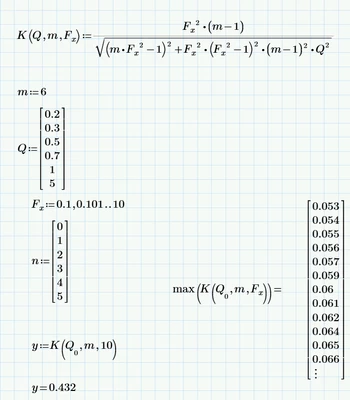
As the picture above, I want to get the max value for the function K,under a certain condition, but the max() return the value like a matrix,so  how can I get the right value?

Best answer by Werner_E

Ahh! So far I had overlooked that you just used the first value of vector Q when you tried to apply the "max" function, not the full vector.

So you are only interested in the maximum value of K for m=6 and Q=0.2.

This can be done the way you had tried. Just 2 corrections:

1) You have to define F as a vector, not a range

2) You must apply vectorization (the arrow over the expression)
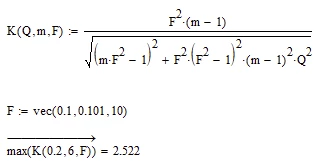
Werner_E_0-1749128690280.png

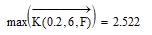
actually just the function call of K must be vectorized
Werner_E_1-1749128809760.png

This gives you the max value of K, but does not reveal the corresponding F-value.

You could use the "match" function to get the index of the max values and calculate the F-value from this:
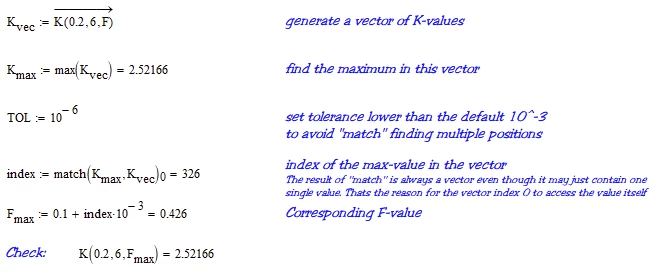
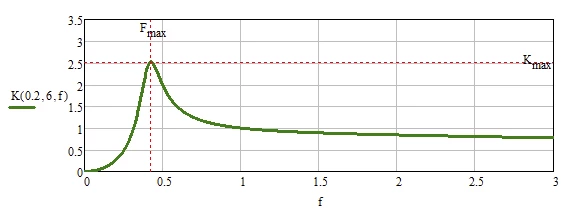
Werner_E_3-1749130671575.png

Werner_E_4-1749130948984.png


As already written in a previous answer you could also use the derivative to get F a bit more accurate.
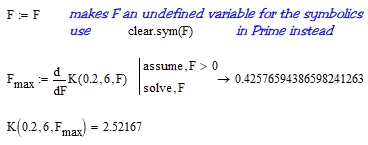
Werner_E_1-1749130467612.png


BTW, in case you are not using Prime 11, the "vec" function is not available. But its easy to create your own "vec" function:
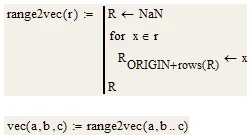
Werner_E_2-1749130539353.png


3 replies

25-Diamond I
June 5, 2025

Problem is that F is not a vector but rather a range variable.

So you want m to be constant 6 and find the maximum of the 59406 values you get when you combine any of the 6 Q-values with any of the 9901 F-values?

First you have to define F as a vector. If you are using Prime 11 you can use the new function "vec" -> Fx:=vec(0.1, 0.101, 10)

Then you have to create a matrix (6 x 9901) with all the values. You may either use a small program with two nested for loops or use two range variables to index the elements. The last step is to use the "max" function to find the maximum of all the values in the matrix.

Werner_E_0-1749105078714.png

Of course you would get a different result as I did not bother to use your function and your values in the vectors.


Another option would be to do without the "max" function but simply looping through all the values and keeping the largest one so far:

Werner_E_0-1749107024106.png


For future questions keep in mind that you always should attach the worksheet itself, not just a picture and that you should say which version of Prime you are using.


3-Newcomer
June 6, 2025

Hi,thanks a lot! 

okay! I will remember that when asking for help, it's better to attach the worksheet. 

By the way, I have found that in order to get XY plot , I need to define the Fx as  a range variable (And I am using Prime-11). But the max() is working need to define the Fx as a vector.

GT_13604326_0-1749177993049.png

My early idea is to get the max value to draw the line like this picture.

GT_13604326_1-1749178154800.png

And the final result is to get like this picture, to differentiate the areas between left and right

GT_13604326_2-1749178244580.png


ttokoro
21-Topaz I
21-Topaz I
June 6, 2025

image.png

t.t.
19-Tanzanite
June 5, 2025

Hmm.  It's worth drawing a graph first:

 (I've just set m to the constant value of 6, and not included it as an input variable below) 

Fn.png


EDIT

When F = sqrt(1/6), Q=0, then K = 8.333333340*10^8


25-Diamond I
June 5, 2025

You are right - the value you found is not the max, When you set Q=0 as you did, we have a singularity at F=1/sqrt(6), So the "max" here is infinity 😉


But we don't know what @GT_13604326  means when he writes "under a certain condition".

Maybe he is only interested in the six Q values (0.2 to 5) and 9901 F values (0.1 to 10) he provided. So maybe Q never should drop beneath 0.2.

In this case the maximum is 2.522 for Q=0.2 and F=0.426. This max value could be increase by about 10^-5 if F is allowed to be set at 0.42576594386598241263.

For a value of Q>0 we can use the derivative wrt to F to find the max position.

Werner_E_6-1749125685952.png

Werner_E_7-1749126078906.png


Werner_E_5-1749125189137.png


19-Tanzanite
June 5, 2025

@Werner_E wrote:

We don't know what @GT_13604326  means when he writes "under a certain condition".

Very true.  

Werner_E25-Diamond IAnswer
25-Diamond I
June 5, 2025

Ahh! So far I had overlooked that you just used the first value of vector Q when you tried to apply the "max" function, not the full vector.

So you are only interested in the maximum value of K for m=6 and Q=0.2.

This can be done the way you had tried. Just 2 corrections:

1) You have to define F as a vector, not a range

2) You must apply vectorization (the arrow over the expression)

Werner_E_0-1749128690280.png

actually just the function call of K must be vectorized

Werner_E_1-1749128809760.png

This gives you the max value of K, but does not reveal the corresponding F-value.

You could use the "match" function to get the index of the max values and calculate the F-value from this:

Werner_E_3-1749130671575.png

Werner_E_4-1749130948984.png


As already written in a previous answer you could also use the derivative to get F a bit more accurate.

Werner_E_1-1749130467612.png


BTW, in case you are not using Prime 11, the "vec" function is not available. But its easy to create your own "vec" function:

Werner_E_2-1749130539353.png