Solved
How to handle Input Expression to an Excel Component where the variable has units?
I understand that the Excel component does not "know" about units of measure internally.
But if want to enter the value for a variable into the Excel component in a particular set of units, how do I do it?
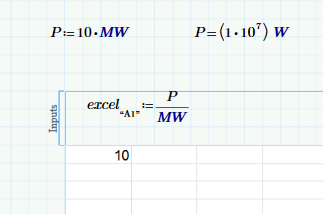
For example, I have a variable "Power" in the MCP 3 which uses units of MW, e.g.:
Power := 10 MW
If I evaluate Power in MCP 3, by default, I get the following:
Power = (1 x 10^7) W
And 1 x 10^7 is also the value I get in the Excel Component if I create an Input Expression and set it equal to "Power".
But, if I want to have the value in the Excel to be 10 (i.e. MW), how do I make that happen? Is there some way to implement the Input Expression so that I get the value in the correct units?
Thanks in advance.
--Doug