

1-Visitor
April 15, 2015
Solved

how to handle lengthy formulas in mathcad

  • April 15, 2015
  • 2 replies
  • 5331 views

if we use lengthy formulas, it went outside the page frame. anybody please help me if there is any possibility to reduce formula length

Best answer by AndyWesterman

Capture.PNG

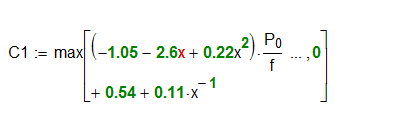
This is possible:

Position the cursor to a point where you want the split (it has to be a + operator).

delete the + to leave a place-holder then press <CTRL><Enter>

2 replies

17-Peridot
April 15, 2015

Hello ballaji,

the short answer is: you don't!

Unforftunately Mathcad, and notably Mathcad Prime, don't automatically handle euqartion display. So you're left to yout own devices.

I suggest splitting up lengthy equations into sub units and add them up later to a master equation.

E.g. f(x)=x2 +a*x3 -c

g(x)=d*x4+e^(x/55)+c+x2

d(x)=f(x)+g(x)

Raiko

bk_011-VisitorAuthor
1-Visitor
April 15, 2015

Sorry I forgot to mention which version of Mathcad I am using . I am using MATHCAD 15. is there any possibility to control the length of lengthy equations in MATHCAD 15

12-Amethyst
April 15, 2015

Capture.PNG

This is possible:

Position the cursor to a point where you want the split (it has to be a + operator).

delete the + to leave a place-holder then press <CTRL><Enter>

bk_011-VisitorAuthor
1-Visitor
April 15, 2015

thank for your reply, its working fine