

10-Marble
March 19, 2017
Solved

How to input ".." correctly in 1^2+2^2+..+n^2?

  • March 19, 2017
  • 6 replies
  • 1929 views

When i input "+..+" , it appears two gray block, and i will also display in printed pdf files, it is not beauty.

PIC_19_010.jpg

How to input ".."correctly in 1^2+2^2+..+n^2 or a^2+b^2+..+z^2. etc ( without gray blocks)?
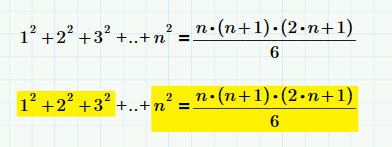
Best answer by Fred_Kohlhepp

A text region with two imbedded math regions.  (A lot of work!)

6 replies

25-Diamond I
March 20, 2017

Are you looking for something like this (use symbolic evaluation)

21-Topaz II
March 20, 2017

jlee100.jpg

23-Emerald IV
March 20, 2017

You should fill the gray blocks with parts of your expression. So the 3 squared goes into the first grey block, the n squared goes into the second.

Success!
Luc

23-Emerald I
March 20, 2017

A text region with two imbedded math regions.  (A lot of work!)

10-Marble
March 21, 2017

Thank you Fred.

Now i can input "1^2+2^2+..+n^2" successfully in MathCAD Prime with your help.

MathCAD Prime can't input "1^2+2^2+..+n^2" successfully without gray blocks in math area.

For formula derivation record, i think word with formula editor(such as MathType) or LaTaX is better.

23-Emerald IV
March 22, 2017

Ah, now I see what you're after. How about:

(Just put a dot on each of the grey boxes).

As a matter of fact I use Mathcad a lot for formula derivation record. It works a lot faster than formula typesetting in MsWord (unless you have efofex)

Luc