10-Marble
March 19, 2017
Solved

How to input square brackets for Formula Derivation?

  • March 19, 2017
  • 2 replies
  • 10810 views

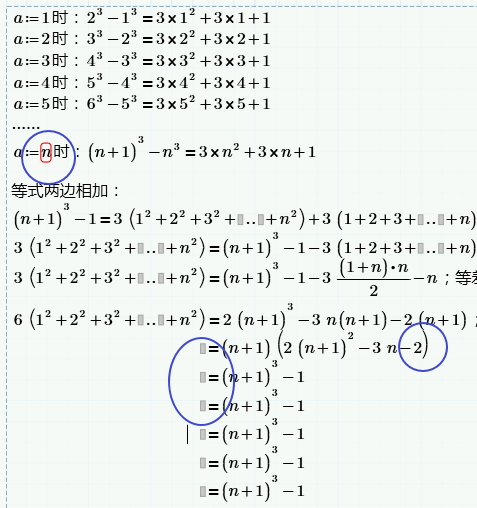
I want to use MathCAD Prime as a Formula Derivation Worksheet, and record the process like the picture below( just for example 😞

I have three problems:

  1. how to remove the red square in a:=n? (it will display when printing)
  2. how to remove the gray block in left side of =?
  3. how to use square brackets outside the Parentheses?

PIC_19_012.jpg

I think it is convenient to do Formula Derivation and record it in MathCAD Prime, do you have a better software or tools?

Best answer by Werner_E

Jeff Lee wrote:

I want to use MathCAD Prime as a Formula Derivation Worksheet, and record the process like the picture below( just for example 😞

I have three problems:

  1. how to remove the red square in a:=n? (it will display when printing)
  2. how to remove the gray block in left side of =?
  3. how to use square brackets outside the Parentheses?

I think it is convenient to do Formula Derivation and record it in MathCAD Prime, do you have a better software or tools?

Mathcad is made primary for calculations, not for type setting formulas

1) So Mathcad will always complain when you assign a variable a an unknown variable n.

You may either

a) use the (fat)  boolean equal sign instead of the assigment :=

b) make it a function like a(n):=n

c) cheat; define somewhere above and way out to the right n:=1

2) Sorry, you can't. In Mathad 15 and below you would have been able to cheat an put a white picture on top of the area you don't want to show and print, but in Prime this does not work as we can't change the order of elements.

3) Again - you can't - or, maybe better: you shouldn't . Square brackets are used for vectors and matrices. Of course you could insert a 1x1 matrix for display purposes:


2 replies

Werner_E25-Diamond IAnswer
25-Diamond I
March 20, 2017

Jeff Lee wrote:

I want to use MathCAD Prime as a Formula Derivation Worksheet, and record the process like the picture below( just for example 😞

I have three problems:

  1. how to remove the red square in a:=n? (it will display when printing)
  2. how to remove the gray block in left side of =?
  3. how to use square brackets outside the Parentheses?

I think it is convenient to do Formula Derivation and record it in MathCAD Prime, do you have a better software or tools?

Mathcad is made primary for calculations, not for type setting formulas

1) So Mathcad will always complain when you assign a variable a an unknown variable n.

You may either

a) use the (fat)  boolean equal sign instead of the assigment :=

b) make it a function like a(n):=n

c) cheat; define somewhere above and way out to the right n:=1

2) Sorry, you can't. In Mathad 15 and below you would have been able to cheat an put a white picture on top of the area you don't want to show and print, but in Prime this does not work as we can't change the order of elements.

3) Again - you can't - or, maybe better: you shouldn't . Square brackets are used for vectors and matrices. Of course you could insert a 1x1 matrix for display purposes:

10-Marble
March 21, 2017

Mathcad is made primary for calculations, not for type setting formulas

Yes, i will use other software to record the formula derivation, such as word with formula editor or LaTax.

What do you recommend for recording or printing the formula derivation process?

23-Emerald IV
March 20, 2017

To prevent the red n (which is undefined), use an "=" instead of a ":=".

To prevent the grey block before the =, fill it with a dot: '.'

You cannot force the bracket type to [ ], unless you use matrix notation:

This is a matrix with one element:

created by first typing a '[', then filling in the expression in between the brackets.

Success!
Luc

10-Marble
March 21, 2017

Thank you