
14-Alexandrite
March 5, 2026
Solved

How to make CWD ( the file location of the input) fixed

  • March 5, 2026
  • 2 replies
  • 335 views

Hi there ,

I need to make CWD ,which is used to identify the location of the input, fixed . So if I send my Mathcad sheet to someone else he can open the sheet and see the calculation.

Is that possible or he has to change the CWD and the input file ( in_file) ?

Regards, 

Yusra


Best answer by terryhendicott

Hi,

Enclosed are three files:

260307-DataCalc.mcdx a Prime9 file.

Data.xlsx a simple Excel file.

Data.txt a simple text file


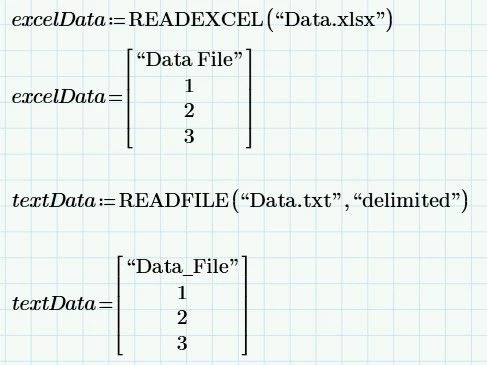
The entire contents of the Prime file is shown below. 

No CWD statement.

No path in front of the file names.

Capture.JPG

Just put the three files in the same folder anywhere on your system.

Open the Prime file by navigating to folder in open file dialog.  You may need to press [Ctrl]+F5 to recalculate the sheet once open to read the files.

It will work.


Now move or copy the three files to a different directory.

Open the Prime file in the new location. Again you may need to press [Ctrl]+F5 to recalculate the worksheet.

It will work


Cheers

Terry

2 replies

23-Emerald IV
March 5, 2026

The best portable method is to NOT use CWD inside the mathcad sheet, but to have the associated file(s) in the same directory as the Prime sheet file. In that case you need not specify a path to any file.


Success!
Luc

25-Diamond I
March 5, 2026

CWD = Current Working Directory

Its a system variable set at startup containing the directory where the Prime file in use was loaded from.

So this system variable will automatically change if the Prime file is copied to and loaded from a different location.

Actually CWD has nothing to do with "file location of the input", but you could use it instead of ".\" to define the path of data files when the are placed in the same directory as the Prime file itself or in a path relative to it.


Can you explain in more detail and maybe with concrete examples what problem you experience when using CWD?


14-Alexandrite
March 6, 2026

Well , when I send the sheet to another computer . the other person has to change CWD in order to see the input  and for  calculation and results to appear  like they are  in my screen . And this a little bet time consuming . 

What I want is > the other person can have access to the calculation without the need to change file location . Maybe a trick to download the sheet in his laptop in the same location I have in mine so he doesn't need to do anything.

21-Topaz II
March 6, 2026

Hi,

Well , when I send the sheet to another computer . the other person has to change CWD in order to see the input  and for  calculation and results to appear  like they are  in my screen.

No.  Have been using Prime for many years now and have never set CWD in my worksheets.  Have sent my worksheets to many people around the world and they never have trouble opening, seeing, or using the worksheets.  Just as I have not had problems with their worksheets.  There is no real reason to set CWD to a value in the worksheet..  Let it happen in the background automatically.


For data files that are used as input to or output from Prime, put those data files in the same directory as the worksheet as Luke suggests.


Cheers

Terry