
10-Marble
March 17, 2017
Solved

How to make the formula vertical alignment?

  • March 17, 2017
  • 2 replies
  • 2444 views

How to make the formula vertical alignment?

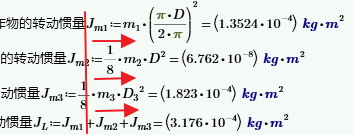
I have some formulas like the picture below, how to make the formula vertical alignment in one vertical line?

Now i use "Tab" key in keyboard, but it is not convenient.
PIC_17_006.jpg

Best answer by Fred_Kohlhepp

The alignment tools that were in Mathcad 15 were not deemed worth including in Prime.  (It has been requested. . .)

The only way to align things in Prime is (AFAIK) to select and drag them.

2 replies

23-Emerald I
March 17, 2017

The alignment tools that were in Mathcad 15 were not deemed worth including in Prime.  (It has been requested. . .)

The only way to align things in Prime is (AFAIK) to select and drag them.

1-Visitor
August 23, 2025

Is there a solution for this alignment problem. I have a customer who is extremely picky about how the reports look!!! Not only vertically as shown in jlee-10-11-12's picture above but also horizontally? I'm too used to PowerPoint I guess. Alignment help.png

25-Diamond I
August 23, 2025

@RH_14029342 wrote:

Is there a solution for this alignment problem.


No, PTC still provides no means to vertically or horizontally align regions. All that's provided is the regions snapping to the grid if you move them manually. So you are on your own.

Its not real Mathcad, its just Prime 😉

Of course you could place the math regions inside a text box. I personally dislike very much doing so because I feel it makes editing much harder to do, but you would have a few options for horizontal alignment that way:

Werner_E_0-1755968664528.png


10-Marble
March 18, 2017

Thanks very much for your help.