

1-Visitor
June 22, 2016
Solved

How to pass temperature into Excel?

  • June 22, 2016
  • 21 replies
  • 7069 views


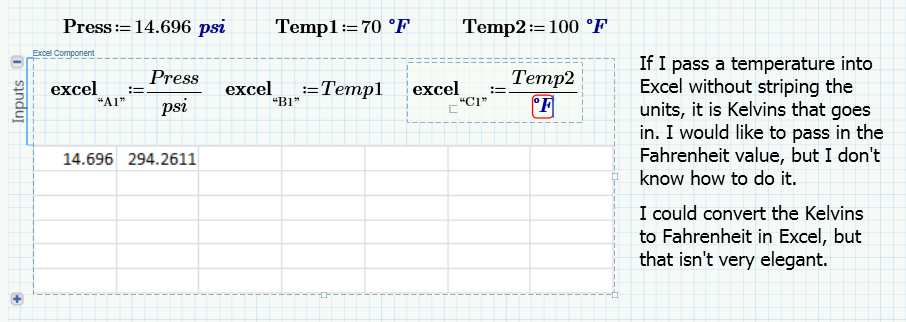
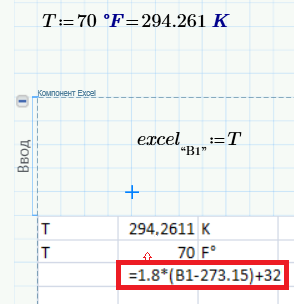
Does anyone know of a good way to pass temperatures into an Excel component? The method of "stripping" the units by dividing by the units doesn't seem to work with temperatures. The workarounds I can think of are not very elegant. Thanks!
TempUnit.PNG

Best answer by ValeryOchkov

21 replies

24-Ruby IV
June 22, 2016

1-Visitor
June 22, 2016

Thanks, Valery. I did think of converting K to F in the spreadsheet, but I was hoping there was a way to avoid that step. I guess not.

I think it would be great if the excel component interface would manage the units automatically, but I guess this will have to wait for the future.

Thanks, again.

24-Ruby IV
June 22, 2016

You welcome!

Second variant

19-Tanzanite
June 22, 2016

You need to use the inverse unit:

Although the inverse unit exists in Prime, I don't know how to create it. I cannot find it anywhere. I created the one in the attached file by converting a Mathcad 15 worksheet.

1-Visitor
June 22, 2016

Thanks, Richard. So, if I had a sheet with the inverse units in it, you think I could use them to strip the units as they go into Excel? This would preserve the units for use elsewhere in the sheet. But, to make this work, I would have to be using a sheet that was converted from Mathcad 15, correct?

19-Tanzanite
June 22, 2016

But, to make this work, I would have to be using a sheet that was converted from Mathcad 15, correct?

Yes, but that's why I posted the sheet. You can just copy and paste the inverse units to your sheet.