

1-Visitor
April 26, 2013
Solved

how to plot a function with the same variable multiplied

  • April 26, 2013
  • 3 replies
  • 4048 views

Hello all,

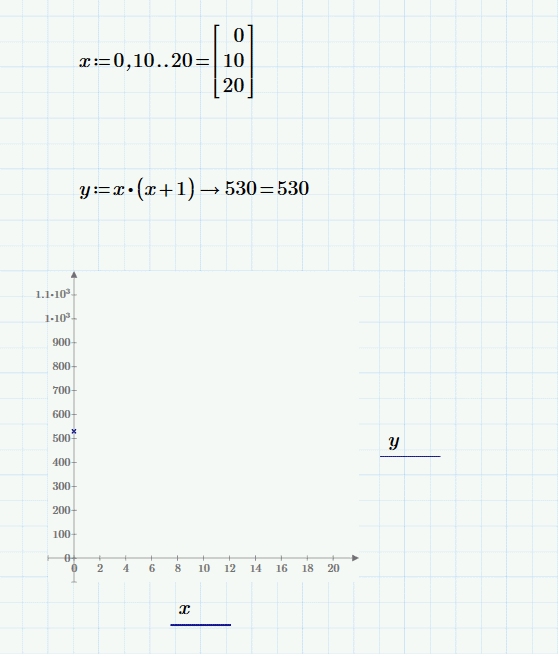
I'm trying to plot a mathcad xy graph but with results dismal.
Mathcad.png

As you can see from the image , since the variable is repeated the array of points become an integer again and so the graph just shows one point.

I know i could multiply the function so that it become x^2+x but this in not a solution since this is just an example for a much more complicated function I need to plot, that would become simply a monster if i would multiplicate all toghether.

Hope there's a easy solution for this problem!

Thank you
Best answer by ptc-5080241

Hello ,

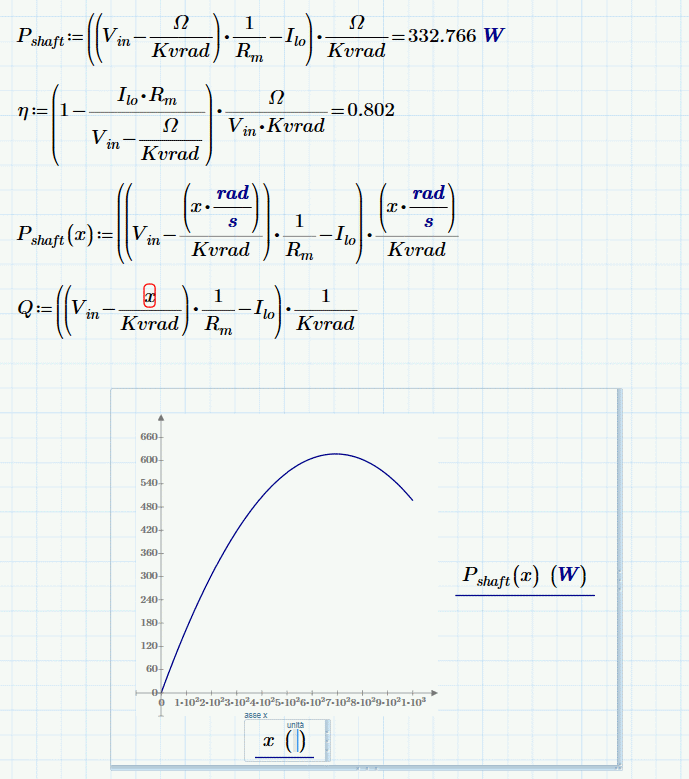
I solved apparently the problem was the unit definition. I have multiplied for the proper unit directly in the function and than changed the range of the graph appropriately, and this did the trick.

Mathcad.png

Thank you very much!

3 replies

25-Diamond I
April 26, 2013

You have to define a function: y(x):=x*(x+1)

Then use y(x) in the plot, too.

You should in any case change your range variable x (you only define 3 points that way) or leave it away completely. You do not have to define x if you only want to plot unless you really want more control, but you can change the range of x directly in the graph, too.

For future questions: please attach a worksheet whenever possible (upper right - "Use advanced editor").

parabola.png

1-Visitor
April 26, 2013

Thank you for your answer,

the reason why i define arange is because I need a larger range than -10 to 10 and besides the actual function I'd like to plot is this one:

mathcad2.png

As you can see no problem evaluating Pshaft when omega is given but if I try to plot the Pshaft(x) with x as a variable the program doesn't plot anything, if I define a range it plot just one point probably since it multipy the two matrices of points.

This issue is puzzling me !

Thank you very much!

25-Diamond I
April 26, 2013

Can't debug a picture, you will have to post your worksheet.

As you write of matrices: In your first posting x was neither a matrix nor a vector (despite the fact it may look like a vector). Its important to distinguish between range variables (which are kind of implicit for-loops) and vectors. From the pic it can't be seen if a variable is a range, scalar or vector. They should be scalars, by no means ranges!

You can edit the default range -10..10 by editing the first, second and last value on each axis, but of course its not wrong defining a range variable

ptc-50802411-VisitorAuthorAnswer
1-Visitor
April 26, 2013

Hello ,

I solved apparently the problem was the unit definition. I have multiplied for the proper unit directly in the function and than changed the range of the graph appropriately, and this did the trick.

Mathcad.png

Thank you very much!

1-Visitor
April 26, 2013

By the way is there any method to plot on a secondary Y axis ?

25-Diamond I
April 26, 2013

Davide Strata wrote:

By the way is there any method to plot on a secondary Y axis ?

In Mathcad - yes, but unfortunately not (yet??) in PRIME.

1-Visitor
April 26, 2013

wow, that's weird