
3-Newcomer
August 18, 2022
Solved

How to remove green outline around duplicate variables in Prime 8.0

  • August 18, 2022
  • 1 reply
  • 6780 views

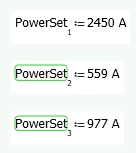
Does anyone know how to turn off the green outline that appears around duplicate variables in Prime 8.0? It even occurs around subsequent members of an array, which are technically not the same variable. Please see the attached screen shot. The green outline didn't exist in Prime 7.0 but suddenly showed up in Prime 8.0. I would like to get rid of it since it doesn't appear very professional in a printout.

IR_10390946_0-1660837511344.png


Best answer by Werner_E

The feature "Redefinition Warnings" was introduced with Prime 8. You can disable it via the menu -> Ribbon: Calculation, Warnings/Redefinition

https://support.ptc.com/help/mathcad/r8.0/en/index.html#page/PTC_Mathcad_Help/Help_WN1_application_enhancements.html#

https://www.youtube.com/watch?v=peysPbP2Ruw

1 reply

Werner_E25-Diamond IAnswer
25-Diamond I
August 18, 2022

The feature "Redefinition Warnings" was introduced with Prime 8. You can disable it via the menu -> Ribbon: Calculation, Warnings/Redefinition

https://support.ptc.com/help/mathcad/r8.0/en/index.html#page/PTC_Mathcad_Help/Help_WN1_application_enhancements.html#

https://www.youtube.com/watch?v=peysPbP2Ruw