
11-Garnet
October 2, 2014
Solved

How to search (find) and replace math terms like identity(3)

  • October 2, 2014
  • 16 replies
  • 6190 views

I am sorry, because I guess that my question is either very trivial (and I missed it), or without positive answer.

I need to change in a Mathcad (v.11 still, but I tried also with v.15) a matrix dimension from 3 to 2.

I have several equations, with "identity(3)" function, that needs to be corrected accordingly. I thought that the replace command would suffice to make a global change. Yet there is no way that Mathcad finds (both regions selected) the terms "identity(3)" in my worksheet, even if they are there. The culprit seems the bracket character.

Is there a way to make the find/replace command work? Thanks.

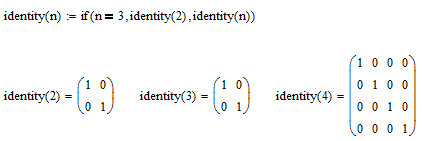
Best answer by Werner_E

A rather crazy idea which I would not recommend at all is to redefine the identity function at the top of the worksheet

Don't comment on the readibility of that worksheet 😉

1.png

16 replies

23-Emerald V
October 2, 2014

anthony Queen wrote:

I am sorry, because I guess that my question is either very trivial (and I missed it), or without positive answer.

I need to change in a Mathcad (v.11 still, but I tried also with v.15) a matrix dimension from 3 to 2.

I have several equations, with "identity(3)" function, that needs to be corrected accordingly. I thought that the replace command would suffice to make a global change. Yet there is no way that Mathcad finds (both regions selected) the terms "identity(3)" in my worksheet, even if they are there. The culprit seems the bracket character.

Is there a way to make the find/replace command work? Thanks.
I don't think there is, unless you feel like saving the file as an xmcd file and then using a text editor to find and replace instances of the corresponding xml strings.

The ability to search and replace on expressions has long been on my wish list - it ought to be possible for the user to just copy an expression, paste it to the find box and have Mathcad find the whole thing, including operators (such as +).

One of the things I've learned is to avoid hard coding numeric constants into my programs. I find it's far easier, both during development and maintenance, to define all constants using a variable.

Stuart

11-Garnet
October 2, 2014

Many thanks StuartBruff.

The find command works correctly with "identity" and "3" in two separate searches. But not "identity(3)" in one go. I was hoping in some special characters like "*" or "?" used in Dos to avoid the undentifiable brackets. But I did not have luck. You seems to confirm this. I now undertstand your wise attitude towards constants.

1-Visitor
October 3, 2014

Could you not use special K mode and refine the variables to allow find to work?

1-Visitor
October 3, 2014

Maybe you could post an example and we can see if there is a way to automate what you are trying to achieve.

23-Emerald V
October 3, 2014

It should definitely be possible to automate it by doing an xml search & replace, especially for a simple expression where you can really work out the replacement string. However, a more general capability would likely prove to be "interesting", as it would need to translate the user-level strings into their xml equivalents ... Unless you could work out how to use the Mathcad GUI, or something like equation editor, to input expressions?

Stuart

1-Visitor
October 3, 2014

StuartBruff wrote:

It should definitely be possible to automate it by doing an xml search & replace, especially for a simple expression where you can really work out the replacement string.

Stuart

This was the sort of thing I was thinking about. However, I believe an example is required from Anthony to decide on the best option.

Werner_E
Werner_E25-Diamond IAnswer
25-Diamond I
October 3, 2014

A rather crazy idea which I would not recommend at all is to redefine the identity function at the top of the worksheet

Don't comment on the readibility of that worksheet 😉

1.png

23-Emerald V
October 3, 2014

Werner Exinger wrote:

A rather crazy idea which I would not recommend at all is to redefine the identity function at the top of the worksheet

Don't comment on the readibility of that worksheet 😉

1.png

Sneaky. I like it, Werner..

Stuart

... until he wants to really define an identity 3, but then I suppose it would be easy enough to define identity3:=identity(3) before redefining identity or even use a difference math style for identity(3).

11-Garnet
October 6, 2014

@^T [StuartBruff, Werner Exinger, Mike Armstrong]

Thanks for the great feedback. I liked the idea of Werner too, though admittedly it is not a good practice. But this comes from my initial bad design. I am still using MC v.11, so xml is not the standard format.

@Mike: I could uploaded my file, but in the essence I wanted to know how to handle a very simple case, like the one posted by Werner's image.

Thanks again.