19-Tanzanite
May 30, 2024
Solved

How to speed up calculation/plotting time when dealing with derivative?

  • May 30, 2024
  • 1 reply
  • 3020 views

Hi,

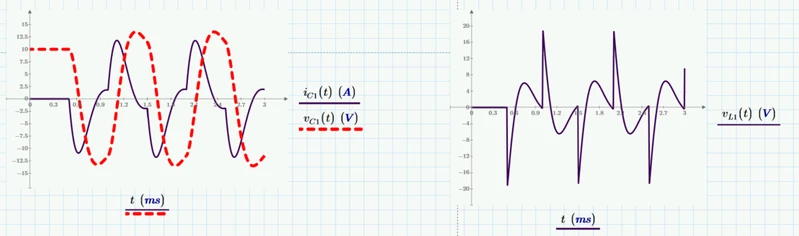
How to speed up calculation/plotting/update time for vL1(t)?
Try changing for example value of R1 from 1 to 2, and compare the time needed for the two graphs to update each other.
vL1(t) plot will take longer to update than iC1(t) and vC1(t) plot. There are some ways to reduce calculation/plotting time for vL1(t)? Or what is the reason of why vL1(t) take much longer time to calculate/plot/update than iC1(t) and vC1(t) calculate/plot/update plot time?
Cornel_1-1717082964827.png

Cornel_0-1717082449079.png

Best answer by Werner_E

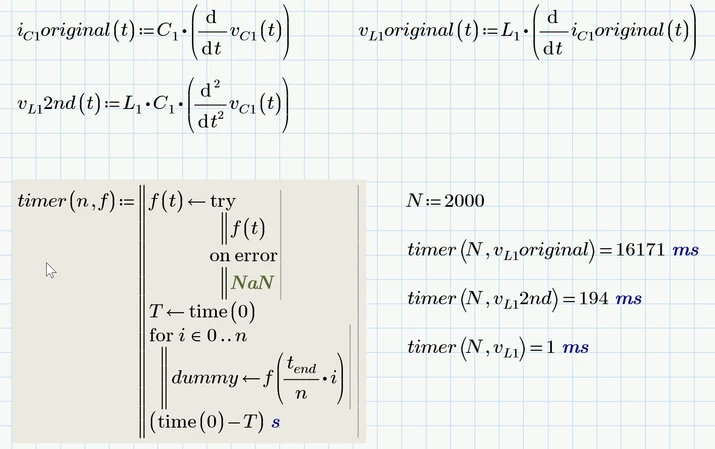
A rather coarse timing of parts of the sheet can be achieved using the time() function as you sure have seen already often in this forum. It is not overly accurate, though, and I would only use it with multithreading switched off.


But in the case of the function you initially asked for you should not need a program as you can surely see the difference "with free eye".


In the attached sheet I compare the calculation speed of your original definition of v.L1, my approach using the second derivative and then my last attempt with the solve block. The results are quite clear.

Werner_E_0-1717097616544.png


1 reply

25-Diamond I
May 30, 2024

A simple way to speed up the calculation of v.L1 is to define that function as being the second derivative of v.C1

Werner_E_0-1717085909000.png


25-Diamond I
May 30, 2024

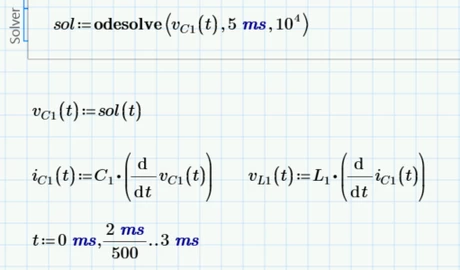
Here is an even speedier approach.
I don't like the idea of making the solve block more complicated as necessary but on the other hand this allows us to completely avoid the more time-consuming numerical differentiation.

Cornel19-TanzaniteAuthor
19-Tanzanite
May 30, 2024

Do You know a program that calculates how long it takes to odesolve block to make/finish the itself block calculation and then how long it takes to the plot to plot/show the graphs?