
11-Garnet
August 18, 2026
Solved

How to turn some variables of a symbolic solution into numeric values

  • August 18, 2026
  • 7 replies
  • 92 views

I am still using the old Mathcad 11.2, despite the difficulties with the new OSes. I asked to ChatGPT for help, but I did not get any solution. 

I wrote (see picture) two equations, and I asked to solve for variables p and w symbolically. 

Afterwards - and only afterwards - however I would like to capture the symbolic solution (in this case of variable w) and turn some symbols into numeric values and make relations with just few variables like w vs. r, so to obtain a function like w(r):= etc., that  I can plot it.
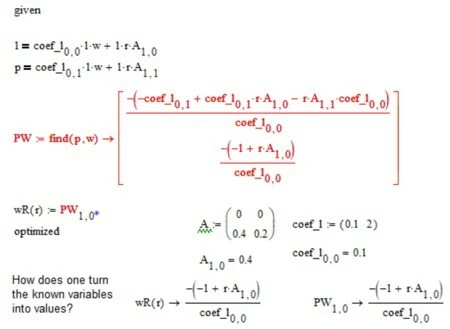
As can be seen from the screenshot, however, MC11.2 appears unable to assign some variables the specified values. ChatGPT suggested defining a new variable and then “optimizing” it, which I tried using wR(r):= ..., but that approach did not work either.

Of course, one could simply copy and paste the solution returned by find; however, I am curious to know whether there is a way to achieve the same result avoiding such a manual intervention.

Thanks in advance for any suggestions or help.
Best answer by LucMeekes

The solution of your symbolic expression is NOT a function of y. The parameter y is undefined, as far as the numeric processor 'knows’, so it rightfully complains. The symbolic processors does not have a problem with undefined variables. If you remove ‘y’ from the parameter lists of both sol() and fun(), it works as expected.

Note that in your Manual_y() function there's also no parameter y….


If you change the function names sol() or fun() into y(), then they symbolically still work. Numerically also, as long as you do not change both of them to y() at the same time. Apparently the numeric processor is smart enough to disregard parameter ‘y’ of function y()…. but it is confusing to do that. Just omit y from the parameter lists.

Success!
Luc

7 replies

Werner_E
25-Diamond I
August 18, 2026

Would have been better to attach your worksheet instead of just pictures. You will have to zip it first and attach the archive as Mathcad and Prime files are not valid attachment in this Mathcad/Prime forum.

You may turn the symbolic calculation into a function in the input variables.

Simply replace PW := … by PW(A, coef_1, r) := …  and after numerically defining A, coef_1 and also r(!) you can numerically evaluate that function.

23-Emerald IV
August 19, 2026

Hi Anthony,


good to see that you're still using Mathcad 11 (not Prime).

As Werner said, it's as simple as:

Mathcad 11 file attached.

Success!!
Luc

11-Garnet
August 19, 2026

@Werner_E  and ​@LucMeekes many thanks indeed.

I confess, after seeing the forum layout changes (I had not posted here for a while), I searched for your names and the dates of your latest posts, to be assured that the service of this community was still first quality.

Thanks, Werner_E, for your suggestion. I thought it was a trivial problem (at least so I believed), and I avoided the complication of uploading files. The problem is not as trivial as I initially thought, and the ChatGPT failure was a sign of it.

LucMeekes, in my eyes you have many merits. One of them was helping me to stick with MC11.2 Classic, even though with Win10 it was not so simple. In a previous post I explained to another user how I did it, but probably the post was removed after the layout changes. Many thanks for your explanatory file too: it is really great.

Following Werner_E's suggestion, and before reading LucMeekes' post, however, I tried to simplify the matter in order to upload the mcd file with a cut-down version of my problem. Both of you suggested a solution to obtain a final numeric result starting from symbolic equations. But actually - as I explained in the opening post - my aim was to have only some variables turned into numeric values (so that they become coefficients), in order to focus on the relationship between two of  those not turned into coefficients and make a plot of them: “w” as a function of “r” in my opening post.

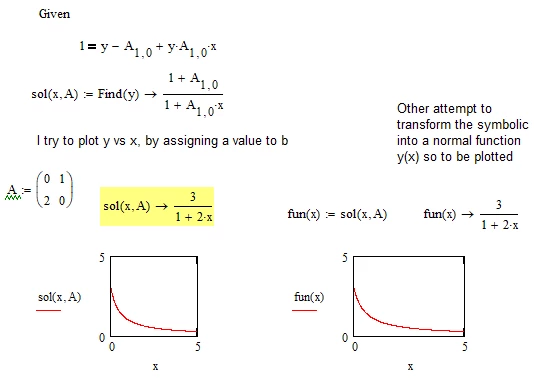
Before reading LucMeekes’ answer and working with his file, here is my attempt with a cut-down version of the problem. In the attachment there is also the mcd file. It shows only three variables, and one of them (A, connected to the matrix) is turned into a value. So the remaining variables were y (which has been solved) and x (my undetermined variable).

In the file (and picture) there are two phenomena: the first is right, while the second is wrong for my aim.

  1. The original “find” function, named sol(y,x,A), correctly shows the numeric value of variable A_1,0 once defined, as does the new variable named fun(x).
  2. However, if I try to plot both of them (i.e. sol(y,x,A) and fun(x)) against variable x, I do not get any result: the plot remains empty with red errors.

What I found soon after was the following, though I do not know exactly why it is so. The important thing, however, is that with the following modification, point 2. also works. I would be curious to know the reason.

If I change just the name of “fun(x)” into “y(x)”, suddenly both plots that did not show any graph work: not only the one on the right side (with the new variable name “y(x)”), but also the one on the left side, with the old “sol(y,x,A)” variable.


Thanks again.

A.


Werner_E
25-Diamond I
August 19, 2026

As Luc already wrote you should not add the variable which you are solving for in the parameter list of the function. Even though we know that this variable will not appear in the function term you would have to provide a numeric value for it when evaluating the function numerically.

This said you could make your functions work if you provide any dummy value for the variable y:

Of course the better option is to omit that parameter altogether.
Similarly the function you define in your original sheet should not use p and w as function arguments as these are the variables you solve for and so they will never appear in the calculated function terms.

LucMeekes23-Emerald IVAnswer
23-Emerald IV
August 19, 2026

The solution of your symbolic expression is NOT a function of y. The parameter y is undefined, as far as the numeric processor 'knows’, so it rightfully complains. The symbolic processors does not have a problem with undefined variables. If you remove ‘y’ from the parameter lists of both sol() and fun(), it works as expected.

Note that in your Manual_y() function there's also no parameter y….


If you change the function names sol() or fun() into y(), then they symbolically still work. Numerically also, as long as you do not change both of them to y() at the same time. Apparently the numeric processor is smart enough to disregard parameter ‘y’ of function y()…. but it is confusing to do that. Just omit y from the parameter lists.

Success!
Luc

11-Garnet
August 19, 2026

@Werner_E and ​@LucMeekes: I am very grateful to both of you. If I could I would make as a right answer both of your posts.

Just to clarify what I was saying in my latest post to overcome the plot problem, and as Luc rightly stated:

If you change the function names sol() or fun() into y(), then they symbolically still work.

and I shall add it works also the plot graphing. I attach here the screenshot of what I described (in green the change of function name).
Thanks again for your precious help.
A.


Werner_E
25-Diamond I
August 19, 2026

When you call a function numerically (and plotting uses numerical evaluation) all provided function arguments must be defined, even if they aren’t used in the term on the right hand side of the definition.