1-Visitor
Jan 12, 2015 1:57 PM UTC
Solved

how to undefine a mathcad 15 built in?

Hi there,

Using mathcad 15, how to undefine the built in "L" and "ton"?

I want my formula's wich are using L and ton to indicate an error when if variables are incorrectly used. This will help me to improve the quality of my sheets.

Best regards,

Frank

Werner_E
Werner_EAnswer
25-Diamond I
Jan 12, 2015 5:00 PM UTC

Using mathcad 15, how to undefine the built in "L" and "ton"?

I want my formula's wich are using L and ton to indicate an error when if variables are incorrectly used. This will help me to improve the quality of my sheets.

I am absolutely clueless as of what kind of error checking you would like to implement and why you would need L and ton to be treated as undefined variables.

But if your intention really is to undefine L and ton as you demanded, you could do it by assigning L and ton an expression which fails when its evaluated. In the examples below I have chosen a divison by zero for L and a nonexisting variable in case of ton. If this solves your problem, you may put those assignments in a collapsed area so its out of way.
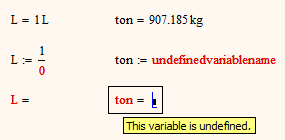

1.png

6 replies

19-Tanzanite
Jan 12, 2015 2:37 PM UTC

The only way to do that is to set the unit system to "none", which would disable all units.

Translate
12-Amethyst
Jan 12, 2015 2:53 PM UTC

is it necessary to use these names exactly? or could you change to a subscripted form

(say) t.on which will display as

Capture.PNG

and similarly L could be L1 or L_ or L.name.

{{{Note that L. will work but WILL be very confusing as it will display as just L }}}

If you want to use units (and I prefer to use them where possible as it has saved me a few mistakes that could have cost hours to trace) then longer names tend to be advisable

Regards

Andy

Translate
Werner_E
Werner_E25-Diamond IAnswer
25-Diamond I
Jan 12, 2015 5:00 PM UTC

Using mathcad 15, how to undefine the built in "L" and "ton"?

I want my formula's wich are using L and ton to indicate an error when if variables are incorrectly used. This will help me to improve the quality of my sheets.

I am absolutely clueless as of what kind of error checking you would like to implement and why you would need L and ton to be treated as undefined variables.

But if your intention really is to undefine L and ton as you demanded, you could do it by assigning L and ton an expression which fails when its evaluated. In the examples below I have chosen a divison by zero for L and a nonexisting variable in case of ton. If this solves your problem, you may put those assignments in a collapsed area so its out of way.

1.png

Translate
1-Visitor
Jan 12, 2015 6:10 PM UTC

That looks like a very odd request indeed. Quite funnily, on a day where we were mentioning the issue of Mathcad Prime not preventing us from redefining/undefining pre-defined variables and functions...

I would certainly never recommend to undefine or redefine pre-defined variable, and units even less (although I did take some liberties with this rule, regarding imperial units, but apart from Americans, British and crazy people, who chooses to use those anyway ?). Using units everywhere where possible is the first line of defense against errors and typos.

Like any rule, it can be broken when one knows what he is doing, but from my little experience, it causes lots of problems more often than not...

Translate
24-Ruby IV
Jan 12, 2015 5:42 PM UTC

LL.png

Translate
FrankvR1-VisitorAuthor
1-Visitor
Jan 13, 2015 8:07 AM UTC

Thanks WE. The eror checking works now.

Capture.PNG

Translate