
21-Topaz II
September 25, 2018
Solved

How to use "Compare Worksheets"?

  • September 25, 2018
  • 1 reply
  • 1714 views

Hello everyone!
I am trying how the MAthcad 15 "Compare Worksheets" command works, it is present in Tools. In this regard, I did not find a mention in the guide. So for proof, I created two very similar and very simple worksheets, but I do not understand how the comparison works. For example the constant b has different values and the number of  letters M in the two strings is different but there is no indication about. I enclose a photo of the result.

I thank you in advance for your reply.

Greetings Francesco Mezzanino.
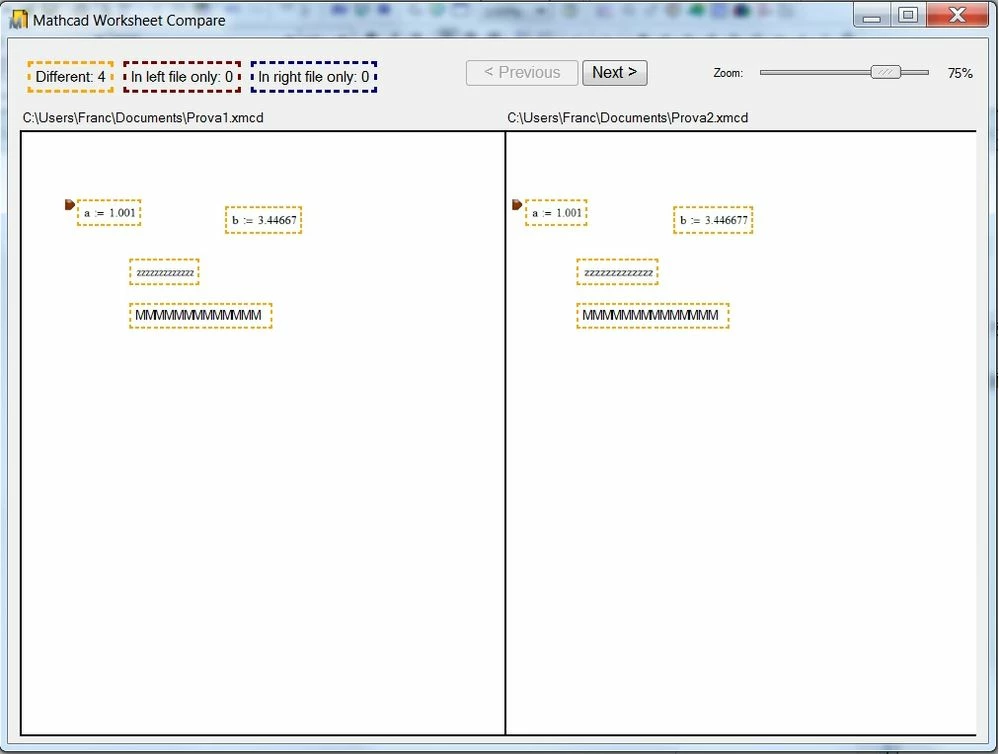
prova.jpg

This topic has been closed for replies.
Best answer by LucMeekes

Apparently you have only differences.

Note that differences could also be that the same expression exists, but on a (slightly) different location on the sheet...


Try to make two resembling sheets by first creating one, then create the second by making only small modifications and saving it under a different name. Then do the compare.


Success!
Luc

1 reply

LucMeekes23-Emerald IVAnswer
23-Emerald IV
September 25, 2018

Apparently you have only differences.

Note that differences could also be that the same expression exists, but on a (slightly) different location on the sheet...


Try to make two resembling sheets by first creating one, then create the second by making only small modifications and saving it under a different name. Then do the compare.


Success!
Luc