
1-Visitor
November 19, 2024
Solved

How to use match function results to extract rows from another variable - Mathcad Prime10

  • November 19, 2024
  • 2 replies
  • 1573 views

Hello Community,


I'm pretty new to Mathcad, so I'm sure I'm just missing something quite basic and obvious.


What I'm trying to achieve is to use the results returned by the match function, to extract the equivalent rows from another variable.


Given variable A and var. B use the match function to find the row index for values greater or equal to 2.5 in B, and use those indexes to create a new var. containing the values in A for the indexes (or just print directly from A).


The result I was expecting was the new variable to return "Ac" and "Ad".
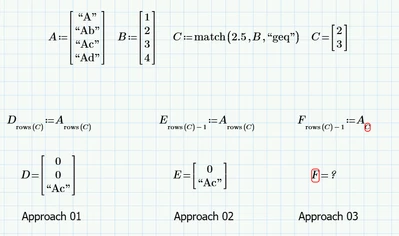
 

SC_12404331_0-1732027635177.png


I originally thought it should be a fairly easy task, something like the shown in "Approach 03" of the screenshot.

However, I'm finding all sort of errors when trying different approaches. The more predominant error bein: "This value must be and integer"


Any help, please?


Thanks! 🙂


Best answer by StuartBruff

Try using the function lookup instead of match.


Stuart

2 replies

23-Emerald V
November 19, 2024

Try using the function lookup instead of match.


Stuart

1-Visitor
November 19, 2024

Of course!


It was as simple as using the right function 🤦


Thanks very much, Stuart.

You've saved me from (more) hours of looking at the screen and scratching my head!

🙂

25-Diamond I
November 19, 2024

Of course, as Stuart suggested, you should use “lookup” because this function does exactly what you want.


Just out of my own play instinct, two variants that still use “match” (not a recommendation!).
The first uses the already computed vector C with the index values to use and processes it in a loop.
The second variant uses “match” to find exactly the complementary indices and then uses them in the “trim” command to delete these lines.

As shown this also could be done in one go.
But as already mentioned, you sure should use “lookup” here and not fiddle around with "match".

Werner_E_1-1732049139324.png


1-Visitor
November 20, 2024

Thanks very much for your reply, Werner.


Although Stuart gave us the correct solution, playful and adventurous solutions are most welcome too! (and even encouraged sometimes🙈)


Actually, your solution just adds a little bit more learning to the learnt from Stuart's solution!


Thanks both 🙂

23-Emerald V
November 20, 2024

@SC_12404331 wrote:

Thanks very much for your reply, Werner.  @we


Although Stuart gave us the correct solution, playful and adventurous solutions are most welcome too! (and even encouraged sometimes🙈)


Actually, your solution just adds a little bit more learning to the learnt from Stuart's solution!


Thanks both 🙂


Apropos of nothing, I have an inordinate fondness for wolves (canis lupus not Wolverhampton Wanderers).   I think it was Dave Mech, who once commented, "Too old to play, too old to be a wolf".  I've occasionally wondered if the same isn't true for humans ...


Stuart