
12-Amethyst
July 24, 2015
Solved

How to use MySQL with DSN in Prime 3.1 with ODBCread ?

  • July 24, 2015
  • 1 reply
  • 1766 views

Hi experts,

I have a sheet done (the demo) with a MS Access DB with DSN and OLE in Prime 3.1. See https://support.ptc.com/appserver/cs/view/solution.jsp?n=CS181327

For this to get run you have to install: (See the Q&A resouce from the web below)

Q: I'm working on a program and it compiles fine, but it gives me a "MSVCR110D.dll is missing.."-error. I run Visual Studio 2013 on Windows 7 64bit, I also use boost 1.55.0 and SFML 2.1. Google and a fellow superuser post didn't help me out. I got told to install c++ redistributable but that didn't help me either. I'm not that good with C++ yet so excuse me if I missed something.

A: The D version is the Debug Runtime. msvcr110 means it needs to C++ 2012 runtime. The file is not redistributable so you need to install Visual C++ 2012 or the 2012 C++ Express Edition, too. Maybe one of your 3rd party libs depend on this file.

I could run it as OLE and DSN. But my question is how to use a MySQL Connector ODBC. I have already installed the MySQL Connector and a DSN defined.

But how must I define the connect string in the MathCAD Sheet?
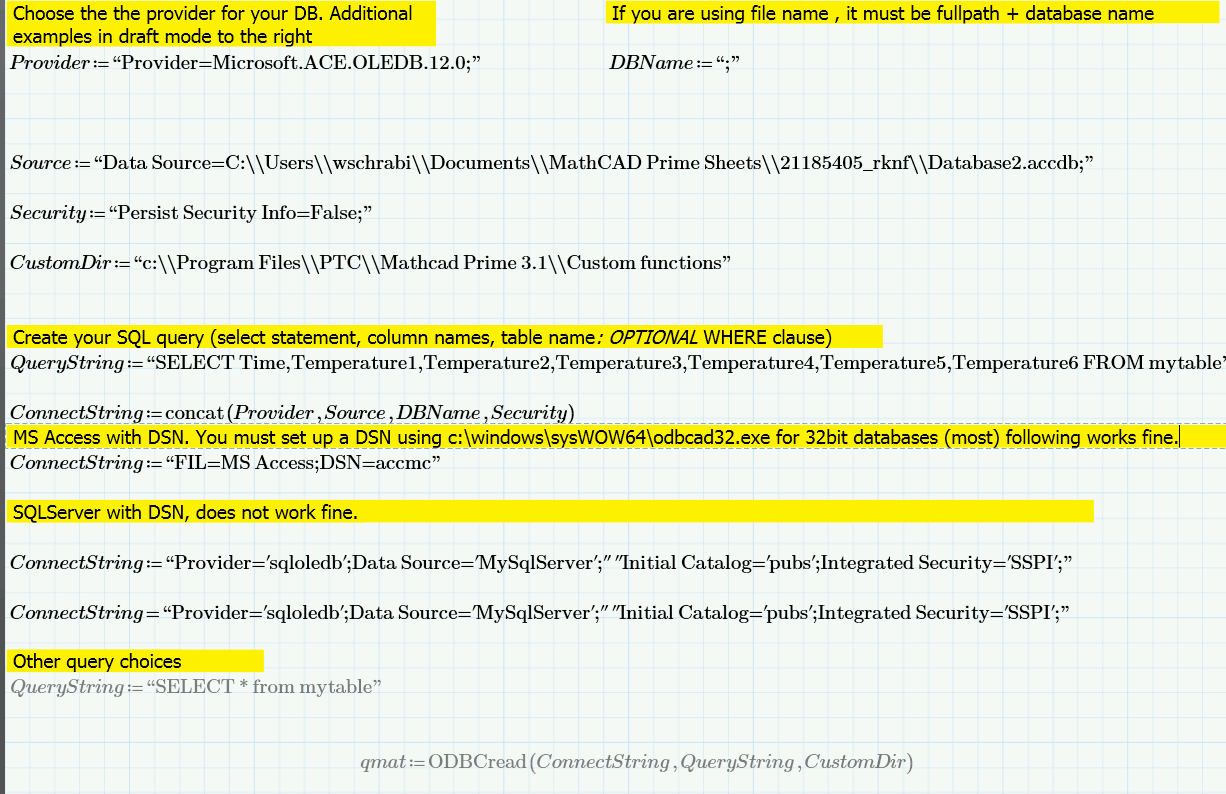
connector.gif

Best answer by WalterSchrabmai

I found the reason, there was some problems with odbcad32.exe

I made a new DSN in the normal Application (Admin Tools > ODBC), not in windows\syswow64\odbcad32.exe

ANd I had to install both 32 bit and 64bit MySQL ODBC 5.3 Dirvers. ( I think I had forgotten to install the 32bit driver before.)

ANd defined the connect string as follows:

ConnectString := "FIL=MS Access;DSN=mathcadASNI.dsn"

and did logging on to check if there are errors. and vola! It works.

BUT: for the ODBCRead  the decimal point must be a . not a comma. So you have to change to english format in the windows settings.

1 reply

WalterSchrabmai12-AmethystAuthorAnswer
12-Amethyst
July 25, 2015

I found the reason, there was some problems with odbcad32.exe

I made a new DSN in the normal Application (Admin Tools > ODBC), not in windows\syswow64\odbcad32.exe

ANd I had to install both 32 bit and 64bit MySQL ODBC 5.3 Dirvers. ( I think I had forgotten to install the 32bit driver before.)

ANd defined the connect string as follows:

ConnectString := "FIL=MS Access;DSN=mathcadASNI.dsn"

and did logging on to check if there are errors. and vola! It works.

BUT: for the ODBCRead  the decimal point must be a . not a comma. So you have to change to english format in the windows settings.