24-Ruby IV
October 4, 2022
Solved

Hyperbola transformed to a canonical form

  • October 4, 2022
  • 1 reply
  • 4416 views

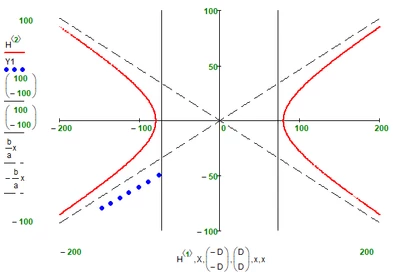
I bring the curve of the second order (hyperbola - red curve) to the canonical form. Why don't my starting blue points end up on a hyperbola transformed to a canonical form. Help me please!

Mathcad 15 in attach.
ValeryOchkov_0-1664887070561.png


Best answer by Werner_E

Instead of changing the value of the angle or using (pi/2-phi) instead of phi you may also just exchange sin and cos in your two rotation equations.

Werner_E_0-1664900500277.png

I also wondered why you used the "root" function to calculate phi instead of a direct calculation

Werner_E_1-1664900563160.png


This time the sheet is attached 😉

1 reply

25-Diamond I
October 4, 2022

1) You used X instead of X1 in yor second plot


2) The center of the original hyperbola is not in the origin, so you have to translate X and Y by x.o and y0 before you rotate them

Werner_E_0-1664889549061.png

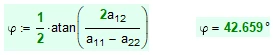
3) You angle phi is wrong. Here you see the original hyperbola (matrix H) translated by (x.0; y.0) and rotated by your angle phi

Werner_E_1-1664889630917.pngWerner_E_2-1664889646109.png


The correct angle to rotate is not 42.659° but rather 90° - 42.659° = 47.341°.


Using all these corrections we get

Werner_E_4-1664889891888.png


24-Ruby IV
October 4, 2022

Thanks, Werner!

Send please the sheet!

25-Diamond I
October 4, 2022

@ValeryOchkov wrote:

Thanks, Werner!

Send please the sheet!


Sorry, I did not save and keep the modified sheet.

But only very few changes are necessary and they can easily be taken from the pictures, I think.

  • Simply add the angle to 90°,
  • add the displacement at the calculation of X1 and Y1 as shown
  • and use X1 instead of X in the plot.

That is all that is necessary.