1-Visitor
September 20, 2018
Solved

I dont know why odesolve cant solve this

  • September 20, 2018
  • 2 replies
  • 3848 views

I'm trying to solve a simple differential equation dCO2L but it does not work with ode solver

I'm curios why.... Need help!

This topic has been closed for replies.
Best answer by LucMeekes

Further, your differential equation is simple enough to solve. Which should save you the hassle of (trying to work with) ranges.
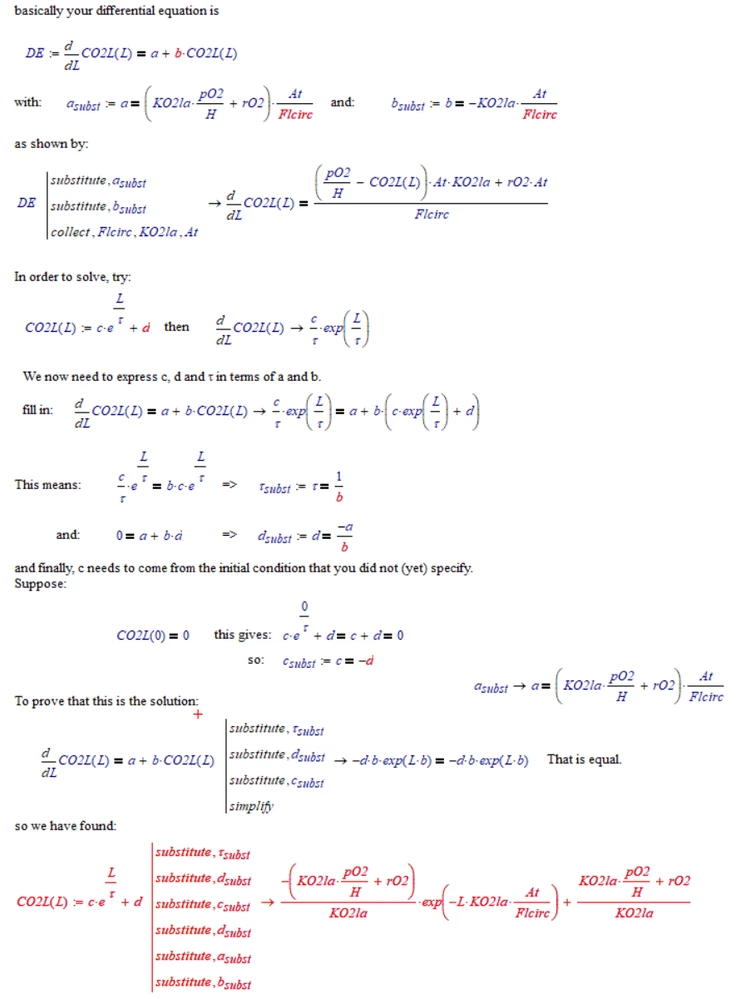
LM_20180920_DiffEq.png


Don't mind the red stuff, its just that the numeric processor doesn't like undefined variables.

LM_20180920_DiffEq1.png


Success!
Luc

2 replies

23-Emerald IV
September 20, 2018

Most probably because you've used a range in the Guess values.

Does it work if you delete from the Guess values:

 L:0,1..LEND

?

Additionally: you HAVE to provide one initial condition for your C02L function. E.g. C02L(0)=0...


Success!
Luc

SavitriN1-VisitorAuthor
1-Visitor
September 20, 2018

Hey there!


I tried, and now it gave error commen like "There are too few equations"....

I dont understand

LucMeekes23-Emerald IVAnswer
23-Emerald IV
September 20, 2018

Further, your differential equation is simple enough to solve. Which should save you the hassle of (trying to work with) ranges.

LM_20180920_DiffEq.png


Don't mind the red stuff, its just that the numeric processor doesn't like undefined variables.

LM_20180920_DiffEq1.png


Success!
Luc

SavitriN1-VisitorAuthor
1-Visitor
September 20, 2018

Yes, exactly! That's why i'm so confused why such a easy one can't give me result.

Thank you very much.

Wish you all the best!


23-Emerald IV
September 20, 2018

There's no doubt. Mathcad (and Prime too) really CAN solve this differential equation numerically. It's just that you have tro set it up correctly.

I can't show you how to do it in Prime (I'm limited to Prime express), but in Mathcad 11 it goes as follows:

LM_20180920_DiffEq2.png

I know that the way to set up a solve block for solving differential equations differs between various mathcad versions. In Mathcad 11 it's different from Mathcad 15, and Prime uses a completely different structure.

I suggest you look up the help information regarding Odesolve and work out some simple examples, to see that it really works, THEN correct your sheet....

Or you just learn how to solve differential equations symbolically (Note that Prime cannot do that out of the box, nor can Mathcad) and use those symbolical results. The calculation of/with resulting functions will(should) go faster, will work outside of the borders that you can set for a solve block, AND symbolically solving might give you some (or all) insight in what is really going on regarding the stuff you are modelling.

All that said, there ARE occasions where you really need the solve block to (numerically) approximate the function described by a differential equation (DE). This usually occurs with non-linear DE's. See for example here: https://community.ptc.com/t5/PTC-Mathcad/Nonlinear-1-ord-differential-equation/m-p/572071#M182386


Success!

Luc
