
13-Aquamarine
August 31, 2016
Question

I need to extract one row of a matrix

  • August 31, 2016
  • 4 replies
  • 14487 views

Hello,

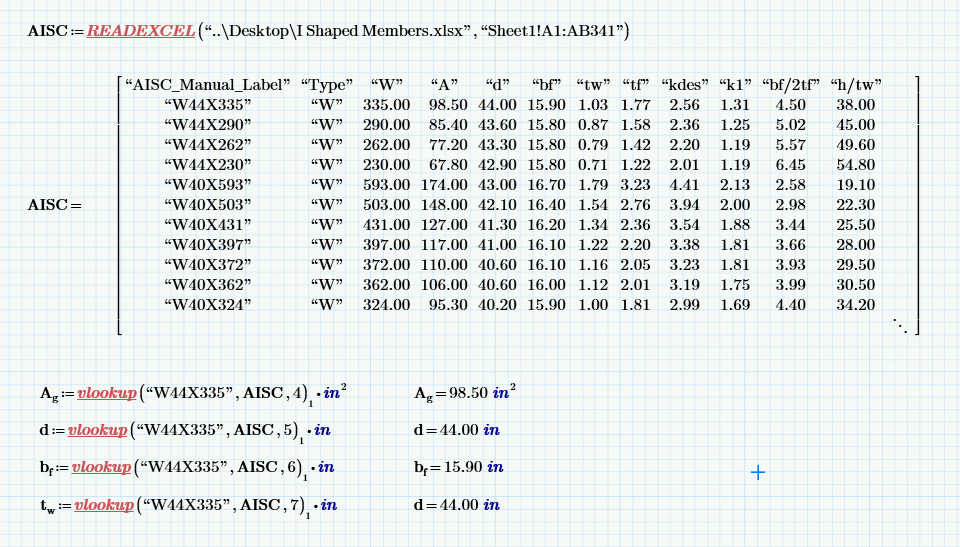
I have a matrix of steel shapes and the corresponding section properties.

Currently for each section property I am using a vlookup function.  This requires I type in the shape of the beam inside each command every time.  There has to be a way to combine a vlookup and extract an entire row based on that lookup item.  I assume I could then put the extracted items into a single column matrix and have each passed into the variables.  This would allow me to only type the shape into a single lookup function.  I'm new to Mathcad so I'm probably overlooking the obvious, but I have searched for a solution and can't find one.  Anyone know of a way to do what I am trying to do?

.matrix.png
4 replies

1-Visitor
August 31, 2016

Use "match" to obtain the row index for specified shape.  Then, use the matrix row function to extract it.

24-Ruby IV
August 31, 2016
bbond13-AquamarineAuthor
13-Aquamarine
August 31, 2016

Thank you all for the help.  I'll see what I can put together with this info.

25-Diamond I
August 31, 2016

1) You could define a variable for your shape like

shape:="W44X335"

and later use this variable in your vlookup commands.

A.g:=vlookup(shape,AISC,4)[1*in

2) As Mark already wrote you can use match to get the row number, like

rownr:=match("W44X335", AISC)[1[1

or to just search in the first column

rownr:=match("W44X335", AISC^<1>)[1

Then you could Primes row selector to assign a variable the full row of data.

You may even multiply this row (you would have to use the vectorization operator!) with a row vector consisting of the appropriate units for each column and assign the result to a row vector consisting of the Mathcad variable names like A.g, f, etc. and you have your single variables with just one command.

The attached may be helpful:

EDIT: Haven't seen Marks last reply before posting my own. I would prefer his "ApplyUnits" over my "multiply" 😉

1-Visitor
August 23, 2017

Hi,


I have a similar case. I have an extensive table with 5 columns (0 to 4) and more than 1000 rows!

I want to select the values for the first 4 variables (each variable in one of the first 4 columns) and find the row that contains the exact values I selected so to find the value of the 5th column (4) at that row.


Any ideas? Thanks!

13-Aquamarine
August 24, 2017
Use match function to find index of row and column of the steel function shape label, then use the mathcad function to extract a row based on the idea of row returned form match function