1-Visitor
Jul 2, 2025 4:16 PM UTC
Solved

If Else Error - The value must be scalar

In PTC Mathcad Prime 10.0.0.0 I am using an if else statement where I am comparing two variables, qu and qt with the same units, psf. However, I am getting the error that the value must be scalar. I am trying to get a return of qu or qt depending on what their values are. I would appreciate help in a solution for this.
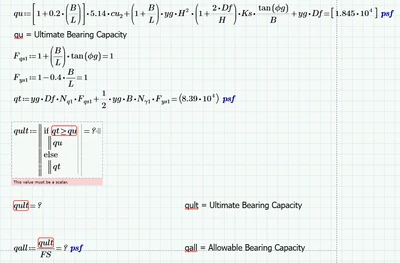

 

JL_9921856_0-1751472967235.png


Werner_E
Werner_EAnswer
25-Diamond I
Jul 2, 2025 4:27 PM UTC

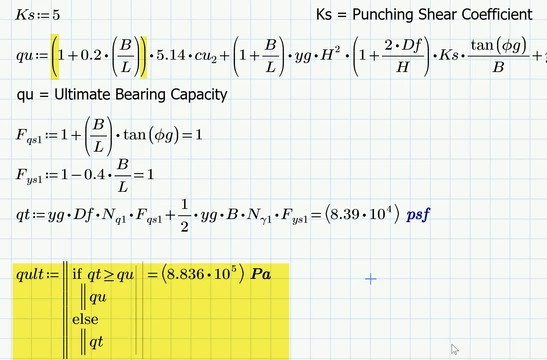
When you defined "qu" you had type square brackets. In Prime doing so creates a matrix and so "qu" ended up being a 1x1 matrix and Prime refuses to compare a matrix (even if its just 1x1) with a scalar.

Solution is to replace the square brackets by normal parentheses. 

Werner_E_0-1751473709039.png


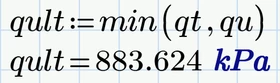
BTW, the "min" function could be used here to achieve the very same result

Werner_E_1-1751473930796.png


2 replies

Werner_E
Werner_E25-Diamond IAnswer
25-Diamond I
Jul 2, 2025 4:27 PM UTC

When you defined "qu" you had type square brackets. In Prime doing so creates a matrix and so "qu" ended up being a 1x1 matrix and Prime refuses to compare a matrix (even if its just 1x1) with a scalar.

Solution is to replace the square brackets by normal parentheses. 

Werner_E_0-1751473709039.png


BTW, the "min" function could be used here to achieve the very same result

Werner_E_1-1751473930796.png


Translate
1-Visitor
Jul 2, 2025 4:30 PM UTC

Werner, this solved the problem. I appreciate your input, I don't use Mathcad often so I am prone to these types of mistakes. Thank you. 

Translate