
1-Visitor
February 25, 2019
Solved

IF programming question

  • February 25, 2019
  • 2 replies
  • 3880 views

Hi all,


For the attached sheet, I am trying to calculate the mid-point of each layer using an if statement. The values are entered using an Excel table. For the first layer, the mid-point is simply H0/2 (so 0.9 m). For the second layer, the mid-point is the previous mid-point, plus the average of the previous and current points (so, 0.9 m + (1.8+1.6)/2 =  2.6 m). For some reason however, the simple IF code I am trying to use doesn't seem to work. I am not very familiar with programming in Mathcad, so any help would be appreciated.

Thanks!

-Fikret
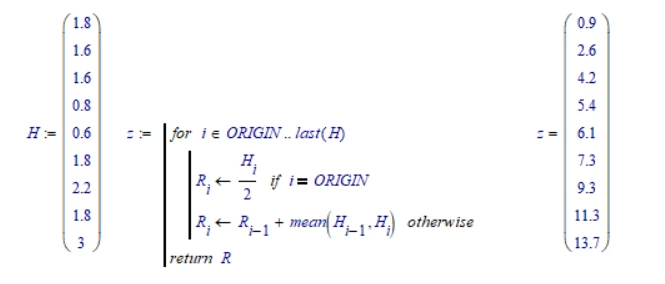
Best answer by LucMeekes

I guess this is what you're after.

LM_20190225_IfStatement.png

Recreate the little program in your Prime, and it should work.


Success!
Luc

2 replies

23-Emerald I
February 25, 2019

@ftatl63 wrote:

Hi all,


For the attached sheet, I am trying to calculate the mid-point of each layer using an if statement. The values are entered using an Excel table. For the first layer, the mid-point is simply H0/2 (so 0.9 m). For the second layer, the mid-point is the previous mid-point, plus the average of the previous and current points (so, 0.9 m + (1.8+1.6)/2 =  2.6 m). For some reason however, the simple IF code I am trying to use doesn't seem to work. I am not very familiar with programming in Mathcad, so any help would be appreciated.

Thanks!

-Fikret


Why isn't the midpoint of the second layer half the thickness of the second layer plus the whole first layer?

(1.8 + 1.6/2)

ftatl631-VisitorAuthor
1-Visitor
February 25, 2019

Both would return the same result, but the if statement still doesn't work because it appears the statement does not store the value for z0. Thanks.

23-Emerald I
February 25, 2019

I can't see Prime 5 files.  Can you attach a pdf file?

LucMeekes23-Emerald IVAnswer
23-Emerald IV
February 25, 2019

I guess this is what you're after.

LM_20190225_IfStatement.png

Recreate the little program in your Prime, and it should work.


Success!
Luc

ftatl631-VisitorAuthor
1-Visitor
February 25, 2019

After I posted, I realized I am missing a for loop to step through the iterations 🙂 What you posted should work; thank you very much!

23-Emerald I
February 25, 2019

A range variable works like a for loop