14-Alexandrite
September 2, 2025
Solved

Import values in Excel and Create a Table in Mathcad P10.

  • September 2, 2025
  • 1 reply
  • 977 views

Hello All,


I have been manually inputting values from an Excel file into a table in Mathcad P10 sheet. I have attached both files. Is it possible to automate this process? I am interested in getting the values I highlighted in yellow in the excel sheet.


Regards,

Sam 

Best answer by Werner_E

How about reading in each column via READEXCEL?

You have to be aware that the so called "tables" in Prime are meant for manual input of  data only, not for display of already existing data.

A Prime table actually just creates a collection of individual vectors.

In your Prime sheet you actually had defined 17 individual vectors.


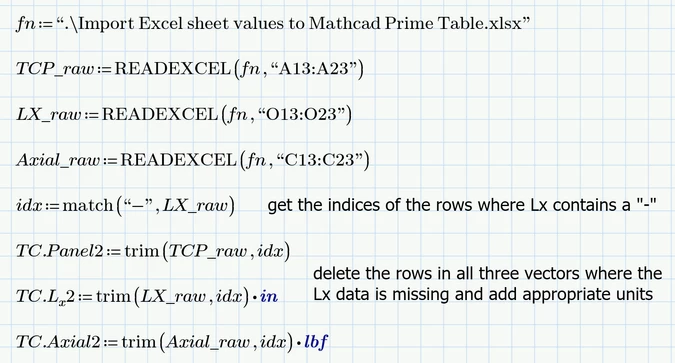
Here as an example the creation of three of these 17 vectors using the data in the Excel sheet:
Werner_E_0-1756826817293.png

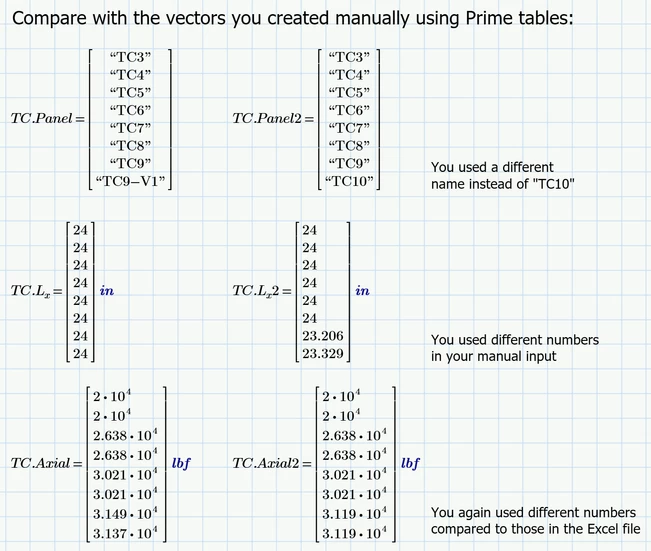
When we compare the vectors created that way with the ones you had manually input we see some discrepancies - in some places you did not use the exact Excel data in your manual input:
Werner_E_3-1756827845120.png


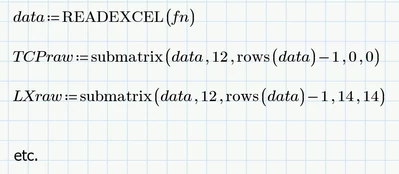
Guess it would also be possible to read in the whole sheet including the data you are not interested in an then use the thus created Prime matrix to extract the data needed.

Maybe something like
Werner_E_2-1756827684180.png


Prime 10 sheet attached


1 reply

Werner_E25-Diamond IAnswer
25-Diamond I
September 2, 2025

How about reading in each column via READEXCEL?

You have to be aware that the so called "tables" in Prime are meant for manual input of  data only, not for display of already existing data.

A Prime table actually just creates a collection of individual vectors.

In your Prime sheet you actually had defined 17 individual vectors.


Here as an example the creation of three of these 17 vectors using the data in the Excel sheet:

Werner_E_0-1756826817293.png

When we compare the vectors created that way with the ones you had manually input we see some discrepancies - in some places you did not use the exact Excel data in your manual input:

Werner_E_3-1756827845120.png


Guess it would also be possible to read in the whole sheet including the data you are not interested in an then use the thus created Prime matrix to extract the data needed.

Maybe something like

Werner_E_2-1756827684180.png


Prime 10 sheet attached


SFares14-AlexandriteAuthor
14-Alexandrite
September 2, 2025

Hi Werner,


Last week, you and Stuart helped me with this reading each column via READEXCEL, as shown below. I just wanted to check if this process can be further automated.

SFares_1-1756828214850.png


Regards,

Sam

25-Diamond I
September 2, 2025

You may be able to use the "filterNaN" function to get rid of the rows containing an NaN.


But to get rid in, for example, in both of two vectors a and b of the lines where vector b contains a NaN, you have to first augment the vectors, then apply "filterNaN" and then separate the matrix again:

Werner_E_0-1756832673424.png
