
14-Alexandrite
September 17, 2025
Solved

Including the value in a combi table in a program

  • September 17, 2025
  • 2 replies
  • 627 views

Hi there , 

I have created this combi table ( the sheet is attached ) 
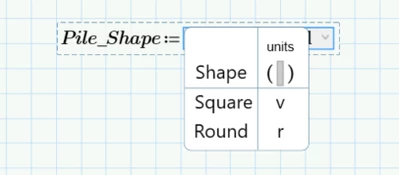
YA_10963798_0-1758105597362.png

I want to use the result in a easy program .. like if the shape is square use this equation if not use the equation for round piles 
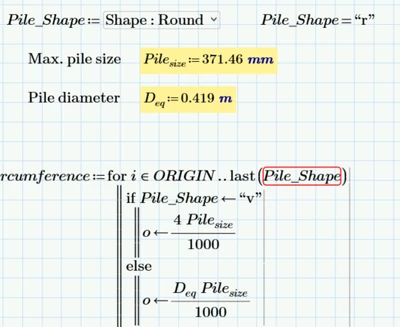
YA_10963798_1-1758105688978.png

can you help me to do so? the easier program the better 

Thanks in advance 
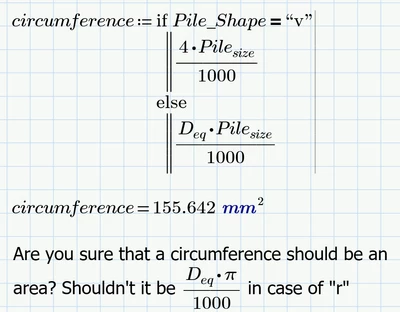


Best answer by Werner_E

@YA_10963798 wrote:

Hi there , 

I have created this combi table ( the sheet is attached ) 


No, sheet is not attached! And to be on the safe side you also should say which version of Prime you are using.


Why are you trying to use a loop??

Why not simply

Werner_E_0-1758108067632.png

Or using the if-function

Werner_E_1-1758108088609.png


2 replies

Werner_E25-Diamond IAnswer
25-Diamond I
September 17, 2025

@YA_10963798 wrote:

Hi there , 

I have created this combi table ( the sheet is attached ) 


No, sheet is not attached! And to be on the safe side you also should say which version of Prime you are using.


Why are you trying to use a loop??

Why not simply

Werner_E_0-1758108067632.png

Or using the if-function

Werner_E_1-1758108088609.png


14-Alexandrite
September 17, 2025

I used the if function and it works . Thanks 

I did attach the sheet but I don't know why it is not posted. 


Thanks anyway 

23-Emerald V
September 17, 2025

Mathcad Prime 10 worksheet attached.


Mathcad Prime 11 screenshot showcasing the new MP11 region border capability.


2025 09 17 A.png


Stuart

14-Alexandrite
September 17, 2025

Thank you for your effort Stuart . I appreciate it

23-Emerald V
September 17, 2025

No worries, Yusra.


Stuart
