1-Visitor
November 11, 2015
Question

incompatible units

  • November 11, 2015
  • 3 replies
  • 10186 views

Hi

Not sure why I am get the incorrect units and the problem cascades down work sheet to produce incompatible units.

Thanks in advance.
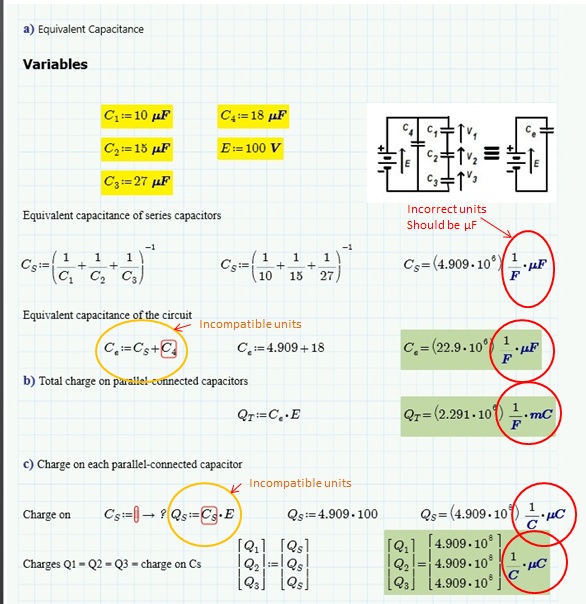
units Capacitance.jpg

3 replies

1-Visitor
November 11, 2015

How about this

Mike

23-Emerald V
November 11, 2015

As a further note, to get Prime to display anything other than the base units (eg, microfarads rather than farads), you have to delete the whole of the displayed units before typing in the unit you want (and the simplest way to do this is to press the End key, then Backspace; this will select the units.  Then either press Backspace again to delete them or just start typing your new units).

Stuart

1-Visitor
November 11, 2015

StuartBruff wrote:

As a further note, to get Prime to display anything other than the base units (eg, microfarads rather than farads), you have to delete the whole of the displayed units before typing in the unit you want (and the simplest way to do this is to press the End key, then Backspace; this will select the units.  Then either press Backspace again to delete them or just start typing your new units).

Stuart

A little cumbersome if you ask me.

Mike

23-Emerald V
November 11, 2015

Mike Armstrong wrote:

StuartBruff wrote:

As a further note, to get Prime to display anything other than the base units (eg, microfarads rather than farads), you have to delete the whole of the displayed units before typing in the unit you want (and the simplest way to do this is to press the End key, then Backspace; this will select the units.  Then either press Backspace again to delete them or just start typing your new units).

Stuart

A little cumbersome if you ask me..

Compared to the M15 way, I think it is.   For a single letter unit, you just have to press Backspace once to clear it, though, not twice as I misremembered.

...Hmm.  Talking of remembering, I wrote a toy, symbolic, general purpose unit handler back in the Matchad 11 days.  I wonder if it will work in Prime now that static type checking is gone ... or did I use some Maple programming operations.   Ah well, yet another thing to add my list of programming projects.

Stuart

25-Diamond I
November 11, 2015

Unfortunately I can't read your file as my Prime 3 can't open files in 3.1 format.

But you were already told that the second assignment, where you did not use any units, was the reason for your problem.

I guess this assignment was done for documentation reasons and you might consider using the symbolic evaluation with the keyword "explicit" instead.

I have redone the first assignment in Mathcad 15 but it should work the same in Prime:

In Mathcad we also have the option to hide the keywords and to change the arrow for an equal sign, so it looks like this

Unfortunately these options are not available in Prime, being just a subset of Mathcad15.

You can also use the assignment directly followed by the symbolic evaluation with explicit in one line.

Again, the second display is not available in Prime (you could also let the := being displayed as a normal 😃

Also bear in mind, that "explicit" works fine in this example, but its use is limited and it may not always give you the display you have in mind.

But all the other alternatives, like writing the expression a second time using the boolean equal sign just for documentation or disabling the second assignment have the huge drawback, that the documentation doesn't really show the actual calculation. You could change the value of C.1 and if you don't update your doc, its showing the wrong values.

Werner

agarson1-VisitorAuthor
1-Visitor
November 11, 2015

Thank for the tip on explicit notation I full understand where you are coming from and did fully understand this function. Is it possible to only have part of the equation in

explicit, see example below.

Thanks

explict All.jpg

23-Emerald V
November 11, 2015
