12-Amethyst
December 20, 2022
Solved

increase page size

  • December 20, 2022
  • 1 reply
  • 1772 views

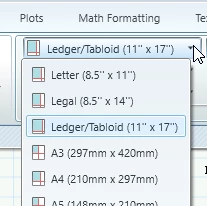
Is it possible to set Page Size larger than 11" x 17"?  My goal is to move the dashed page lines off the screen.  If I have a plotter that prints ARCH E (36" x 48") I should be able to tell Mathcad.
 

size.png


thanks,

russ

Best answer by Werner_E

Real Mathcad (version 15 and below) gave you the choice of paper size depending on the printer (drivers) installed but Prime seems to limit you to just six predefined paper sizes. Thats quite silly but I see no way to set a custom size or use the size the actual output device would support.

Real Mathcad also gave you the choice to either print just the first page width (like Prime does) or to also print the "pages" further to the right (it was in no way an optimal output but at least we could print the full document). In Prime everything outside the paper width can't be printed at all.
But this is just another example of Primes inferiority as its well known that Prime is in many (most) ways not at all an improvement over the old real Mathcad but a (or many) step(s) backward 😞

1 reply

Werner_E25-Diamond IAnswer
25-Diamond I
December 20, 2022

Real Mathcad (version 15 and below) gave you the choice of paper size depending on the printer (drivers) installed but Prime seems to limit you to just six predefined paper sizes. Thats quite silly but I see no way to set a custom size or use the size the actual output device would support.

Real Mathcad also gave you the choice to either print just the first page width (like Prime does) or to also print the "pages" further to the right (it was in no way an optimal output but at least we could print the full document). In Prime everything outside the paper width can't be printed at all.
But this is just another example of Primes inferiority as its well known that Prime is in many (most) ways not at all an improvement over the old real Mathcad but a (or many) step(s) backward 😞

