14-Alexandrite
October 30, 2025
Solved

Installed P11, Text Block, Text Box, Image, Copy and Paste greyed out

  • October 30, 2025
  • 2 replies
  • 424 views

Hello All,
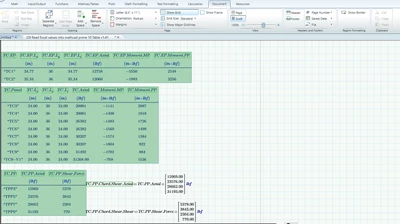
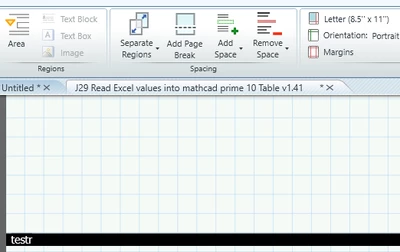
Today I had P11 installed. It is worse than P9 and P10 combined in terms of speed. Also, I dont know why the Text Block, Text Box,  Image, Copy, and Paste  are greyed out.


SFares_0-1761851968680.png

SFares_0-1761853428206.png


Regards,
Sam

Best answer by Werner_E

Also, I dont know why the Text Block, Text Box,  Image, Copy, and Paste  are greyed out.


Try to left click somewhere in an empty space of your sheet and see if that helps.

But then - if the focus (cursor) really would be in some other region (was my first guess, too) it would be strange if "Area" would NOT be greyed out as we can see in your picture. 

I could not duplicate what we see in your picture in Prime 11 (at least not in 11.0.0.0; have not installed the current 11.0.1.1).

Either ALL are active (if the cursor is in an empty space), or all are greyed out (if the cursor is inside a math or text region) or "Area" is greyed out and the others are active (when we are inside an area).

But I could find no situation where Area would be active and the other three are greyed out.

Do you experience this effect right at the start when you create a new worksheet?

Are the keyboard shorts working for creating a text region (Ctrl+T) or a text block (Ctrl+Shift+T)?

2 replies

23-Emerald IV
October 30, 2025

Possibly because you have an item on the sheet selected for which these options are not applicable...?


Success!
Luc

Werner_E25-Diamond IAnswer
25-Diamond I
October 31, 2025

Also, I dont know why the Text Block, Text Box,  Image, Copy, and Paste  are greyed out.


Try to left click somewhere in an empty space of your sheet and see if that helps.

But then - if the focus (cursor) really would be in some other region (was my first guess, too) it would be strange if "Area" would NOT be greyed out as we can see in your picture. 

I could not duplicate what we see in your picture in Prime 11 (at least not in 11.0.0.0; have not installed the current 11.0.1.1).

Either ALL are active (if the cursor is in an empty space), or all are greyed out (if the cursor is inside a math or text region) or "Area" is greyed out and the others are active (when we are inside an area).

But I could find no situation where Area would be active and the other three are greyed out.

Do you experience this effect right at the start when you create a new worksheet?

Are the keyboard shorts working for creating a text region (Ctrl+T) or a text block (Ctrl+Shift+T)?
SFares14-AlexandriteAuthor
14-Alexandrite
October 31, 2025

Hello Werner,


I tried several things. The sheet is 67 pages. Copy button is not grayed out now; however, I clicked it to copy a link but the Paste button remains grayout. It must be thinking or crunching some calculations in the back. 


SFares_0-1761913554895.png


Thanks,

Sam

25-Diamond I
October 31, 2025

From your answer I conclude that you  experience this effect just with this very 67 pages sheet and not always - especially not if you start creating a new sheet, correct?

But its indeed a bit strange.

I simulated ongoing calculations by using the undocumented "sleep" function to delay calculations. Using sleep(60)= should keep Prime busy for a minute and actually the orange circle is running

Werner_E_1-1761917565104.png

and we also see the orange dot at the lower left corner of the sheet indicating that Prime is busy. All the buttons you mentioned were active and I could copy and also paste a region while Prime was busy - even with Multithreading turned off. 

So I have no idea what would cause the greyed out buttons.

Any chance you could contact official PTC support and open a support case?