1-Visitor
September 29, 2022
Solved

Integration tool Problem

  • September 29, 2022
  • 2 replies
  • 2374 views

Hi All,


I'm trying to calculate the properties of a weld. As part of this i need to integrate to the shape area to find area, second moment of area, etc.


One of the piece wise function's gives an error once i go over a certain number on the depth. 


The function works fine when calculating properties about the x axis but not the Yaxis. Please find the problematic function attached.


Any idea's how to fix this?

Best answer by Werner_E

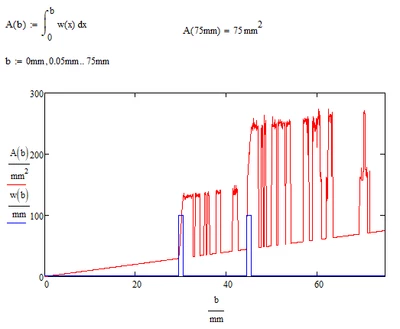
Here is A turned into a function of b

Werner_E_0-1664454215623.png

As we can see, the algorithm used by Mathcad ever so often misses the two peaks for certain end values.

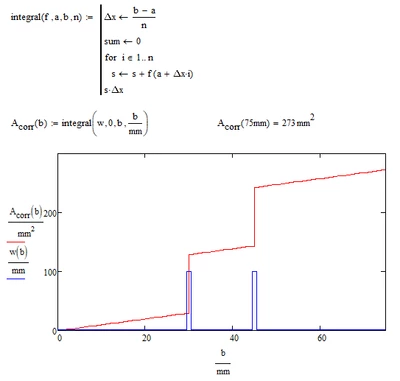
I wrote a quick (and inefficient) integral function just to show what it should look like

Werner_E_0-1664456218490.png

But I won't recommend using this function as it is.


To improve the results of Mathcads integrals you may decrease the value of TOL or chose a different integration method. But neither helps in your case.

I guess you should follow the advice given in the help which says

  • Sharply-peaked integrands, discontinuous integrands, or integrands whose shape is not readily characterized by a single length scale, may not evaluate accurately. We recommend integrating such functions by parts. See methods of numerical integration for more detail.

So instead of

Werner_E_1-1664456926000.png

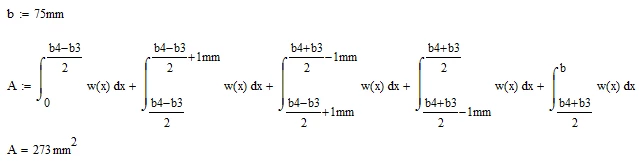
you would use

Werner_E_2-1664456944521.png

to get the correct result.


2 replies

25-Diamond I
September 29, 2022

Which error do you encounter?

I can't see any error message in your sheet.


EDIT: Ah, I see! You were not talking about a Mathcad error but rather about wrong results. The numeric integration of your step function has a of of strange results at various values of b. You can see it clearer if you turn A into a function of b and plot it against b.
Not sure how to fix this other than calculating the area without an integral (which is easy in case of your function but may be a problem with others).

Werner_E25-Diamond IAnswer
25-Diamond I
September 29, 2022

Here is A turned into a function of b

Werner_E_0-1664454215623.png

As we can see, the algorithm used by Mathcad ever so often misses the two peaks for certain end values.

I wrote a quick (and inefficient) integral function just to show what it should look like

Werner_E_0-1664456218490.png

But I won't recommend using this function as it is.


To improve the results of Mathcads integrals you may decrease the value of TOL or chose a different integration method. But neither helps in your case.

I guess you should follow the advice given in the help which says

  • Sharply-peaked integrands, discontinuous integrands, or integrands whose shape is not readily characterized by a single length scale, may not evaluate accurately. We recommend integrating such functions by parts. See methods of numerical integration for more detail.

So instead of

Werner_E_1-1664456926000.png

you would use

Werner_E_2-1664456944521.png

to get the correct result.


14-Alexandrite
September 29, 2022

Hi,


I have had similar problems when working with point loads on beams.

Things that I have found to sometimes work are:


1) Using the adaptive RungeKutta integration option 

2) Convert the square pulse into a cosine pulse with the same area as the pulse. 


See attached 

24-Ruby III
September 29, 2022

@CW_10436044 wrote:


....One of the piece wise function's gives an error once i go over a certain number on the depth...


1. Please show a screenshot of this error.

2. What version of the program are you using?