
11-Garnet
October 23, 2015
Solved

Interactive dynamic system: a simple interaction that does not work

  • October 23, 2015
  • 16 replies
  • 5394 views


Using Mathcad v11, I tried a simple interaction, to update variables according to the movement of time (t).

Two points that have drawn me crazy: I guess the second does not have easy solution.

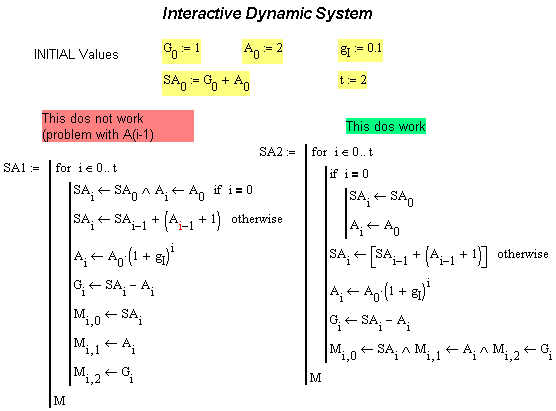
    1. In the picture below, I cannot really understand why the code SA1 does not work, and stops with error at Ai-1. I shall notice that  if I set t=1, it works. So the conditional "if" in SA1 seems ok. Can someone kindly explain what is the problem with t>1, while no problem is found in SA2 code?
    2. I made the error in another sheet - not in the one below - of setting my initial variables with the literal subscript (e.g. A.0) , even when the sbuscript is a number. I would like now to  "Replace" A.0, with a proper numerical subscript. But MC does not accept a paste of Math text into the Replace Window, for such subscript. Is there another way to write it in the Replace Window? Thanks.
Interactive_System_problem_Mathcad.png

Best answer by StuartBruff

anthony Queen wrote:


Using Mathcad v11, I tried a simple interaction, to update variables according to the movement of time (t).

Two points that have drawn me crazy: I guess the second does not have easy solution.

    1. In the picture below, I cannot really understand why the code SA1 does not work, and stops with error at Ai-1. I shall notice that  if I set t=1, it works. So the conditional "if" in SA1 seems ok. Can someone kindly explain what is the problem with t>1, while no problem is found in SA2 code?
    2. I made the error in another sheet - not in the one below - of setting my initial variables with the literal subscript (e.g. A.0) , even when the sbuscript is a number. I would like now to  "Replace" A.0, with a proper numerical subscript. But MC does not accept a paste of Math text into the Replace Window, for such subscript. Is there another way to write it in the Replace Window? Thanks.

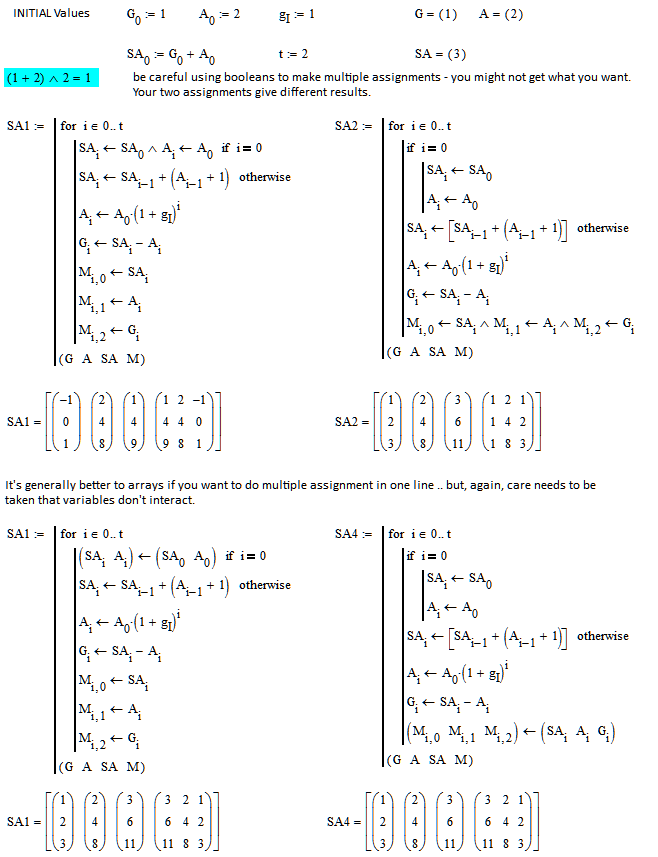
Just to back up Luc's points ... I've changed gI to 1 to make the effects more obvious.  Your code doesn't seem to run into the same error in M15.  I don't know whether this is problem with my typing or M11.  There are several Mathcad constructs (such as the literal versus vector subscript problem you mention) that are difficult if not impossible to analyze without the offending worksheet.  I've attached an M11 version of my M15 worksheet  - do you still get the error?

Stuart

16 replies

23-Emerald IV
October 23, 2015

1.

Without the actual worksheet it's difficult to interpret your code exactly.

Do you realize that the assignment inside the if statement of SA1 only can assign the values 1 or 0 to SAi, while Ai always gets assigned the value of A0 (which you preset at 2? The 'and' operator is not there to allow to put more assignments (or other statements) on a single line, but it is a logical operator, with a logic result (either True or False, 1 or 0 respectively).

What actually happens is that the value of A0 is assigned to Ai (and that seems to be what you want, as shown by SA2), but SAi gets the result of the logical question whether both SA0 and Ai are TRUE (unequal to zero) and looking at the implementation of SA2, that is NOT what you want.

2.

I've run in that problem a couple of times also. It's hand work.

Success!

Luc

11-Garnet
October 23, 2015


Thanks LucMeekes,

I fear for 2, so no surprise that even the MC experts did not have  - unfortunately - workarounds.

You may be correct for  question 1. But then I do not have quite clear why then the "AND" operator works in connecting columns in SA2 (line before the last).

Initially I wrote SA1 avoiding the IF operator, and setting  i  € 1...t not from 0...t as above. Yet, the program gave me  the same kind error when t>1 (to be correct  it does not recognize SAi-1), with the same error message :  "Value of subscript is too big (or too small) for this array".  It did work instead also in that case if t=1. This is a puzzle for me, since values for i=1 (i.e when t=2) are calculated correctly within the script, in the  previous loop of the "for" operator (I say this since for t=1 it works).

If necessary I can upload the sheet, but really there is no much else  that the shown picture, and I try to avoid uploading files that may appear trivial.

23-Emerald IV
October 23, 2015

anthony Queen wrote:

You may be correct for  question 1. But then I do not have quite clear why then the "AND" operator works in connecting columns in SA2 (line before the last).

I checked the result of the SA1 <- SA0 ^ Ai <- A0 assignment in the if statement by adding a line between the if and the otherwise statements with 'return SA1 if i=1' and it gave me 1 (instead of the 3 you probably expected). See also Stuarts analysis.

Likewise the last line in SA2 'works' in that it does not throw an error, but I doubt if you get the result in the matrix M that you were looking for.

As to the reason for the error message occurring with Ai-1 in the otherwise line, I'm still puzzling. Here the actual worksheet may be required because it DOES make a difference compared to a picture...

Success!

Luc

23-Emerald V
October 23, 2015

anthony Queen wrote:


Using Mathcad v11, I tried a simple interaction, to update variables according to the movement of time (t).

Two points that have drawn me crazy: I guess the second does not have easy solution.

    1. In the picture below, I cannot really understand why the code SA1 does not work, and stops with error at Ai-1. I shall notice that  if I set t=1, it works. So the conditional "if" in SA1 seems ok. Can someone kindly explain what is the problem with t>1, while no problem is found in SA2 code?
    2. I made the error in another sheet - not in the one below - of setting my initial variables with the literal subscript (e.g. A.0) , even when the sbuscript is a number. I would like now to  "Replace" A.0, with a proper numerical subscript. But MC does not accept a paste of Math text into the Replace Window, for such subscript. Is there another way to write it in the Replace Window? Thanks.

Just to back up Luc's points ... I've changed gI to 1 to make the effects more obvious.  Your code doesn't seem to run into the same error in M15.  I don't know whether this is problem with my typing or M11.  There are several Mathcad constructs (such as the literal versus vector subscript problem you mention) that are difficult if not impossible to analyze without the offending worksheet.  I've attached an M11 version of my M15 worksheet  - do you still get the error?

Stuart

25-Diamond I
October 23, 2015

The first assignment yields the correct result, too, if typed in the correct way 😉

Probably its better to type parentheses

The Boolean AND between the two assignments has no effect and you could as well replace it by a comma

What you (I am referring to Stuarts sheet)  had typed was

23-Emerald V
October 23, 2015

Werner Exinger wrote:

The first assignment yields the correct result, too, if typed in the correct way 😉

Probably its better to type parentheses

Indeed - or at least until we get an RPN or LISP version of Mathcad

But I didn't "Like" your post for that, Werner.   I did, however, like it for this.   

The Boolean AND between the two assignments has no effect and you could as well replace it by a comma

I didn't realize you could do this outside of a function call or for-loop sequence.   That's why I use the vector method for multiple assignment (which I think is necessary, regardless, for worksheet := multiple assignments).

Everyday's a learning experience

Stuart