21-Topaz II
September 22, 2021
Solved

Intruder font

  • September 22, 2021
  • 2 replies
  • 3628 views

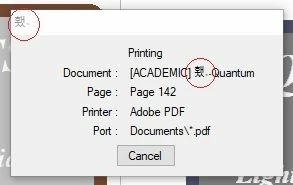
This non-Western font (in the red circle) has been appearing for some time in the print preview phase. Is there a way to delete it and not make others appear?
I thank those who will answer me.

intruder.jpg

Best answer by -MFra-

For some days this disorder has not been seen anymore, perhaps due to the action of the antivirus. Thanks anyway for the interventions.

2 replies

23-Emerald V
September 22, 2021

@-MFra- wrote:

This non-Western font (in the red circle) has been appearing for some time in the print preview phase. Is there a way to delete it and not make others appear?
I thank those who will answer me.

intruder.jpg


It might be non-Western, but it may well be a valid character within one of the standard fonts, most of which offer some Unicode support. Open Character Map and have a look at the Mathcad Unimath Prime font, for example.


Stuart


-MFra-21-Topaz IIAuthor
21-Topaz II
September 22, 2021

OK! But how do you explain the fact that it appears in those places, not being required?

23-Emerald V
September 22, 2021

@-MFra- wrote:

OK! But how do you explain the fact that it appears in those places, not being required?


Without seeing the document, I couldn't say.   I haven't got Mathcad 15, so can't try to print your earlier sample, and I didn't see a dialog box when trying to print an arbitrary 38-page document in Express 7.


Does the "Document" refer to the name of the file?  If so, is there anything in Properties that looks suspicious?


Stuart

25-Diamond I
September 22, 2021

Usually at the position that non-western character is displayed it should say "Mathcad -".

Can it be that you are using a non-western version of Mathcad??

-MFra-21-Topaz IIAuthor
21-Topaz II
September 22, 2021

Are you joking? It is the Mathcad 15 that I downloaded from the site at the time. Never reinstalled.

25-Diamond I
September 22, 2021

No joke. The two (or three ?) non-western characters in both positions they show up should read "Mathcad". I have no idea what could cause displaying Mathcad's name in that foreign non western language. Its sure not the language setting in MC as I suppose you can only switch between Italian and English there. At least in my version there is only the option between German and English. But when I look in the installation directory (subdir "DiffTool") I see that there are also ressource-dll's available in Spanish, French, Italian, Japanese, Korean and Russian.

Have you seen those inappropriate characters elsewhere, too, or was it the print dialogue only?

Would a reinstall of Mathcad solve this annoyance? Not sure if this would help because as far as I am aware the print dialogue is not part of Mathcad but Mathcad may deliver wrong information.