1-Visitor
January 15, 2022
Solved

Issue with plot - These array elements must be scalars. They cannot be vector or matrix

  • January 15, 2022
  • 2 replies
  • 3364 views

Hi,


I have just started using Prime 7 instead of Mathcad 15 and have to convert all my files. The issue is after solving a system of equations, the solutions I get are part of the solution vector I guess. I can perform calculations but cannot plot due to the error mentioned in the title. I have seen similar topics here, but I cannot find a way to solve my issue. I figure it is simple and straightforward.


The file

is attached.


Thanks in advance.

Ali


Best answer by terryhendicott

Hi,

Matrices of one element are formed as part of the calculations.
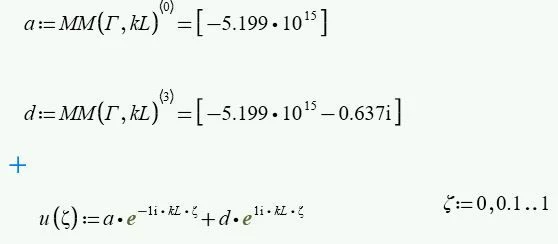
Capture2.JPG

Simply use the zero index to get a number for a and a complex number for d.
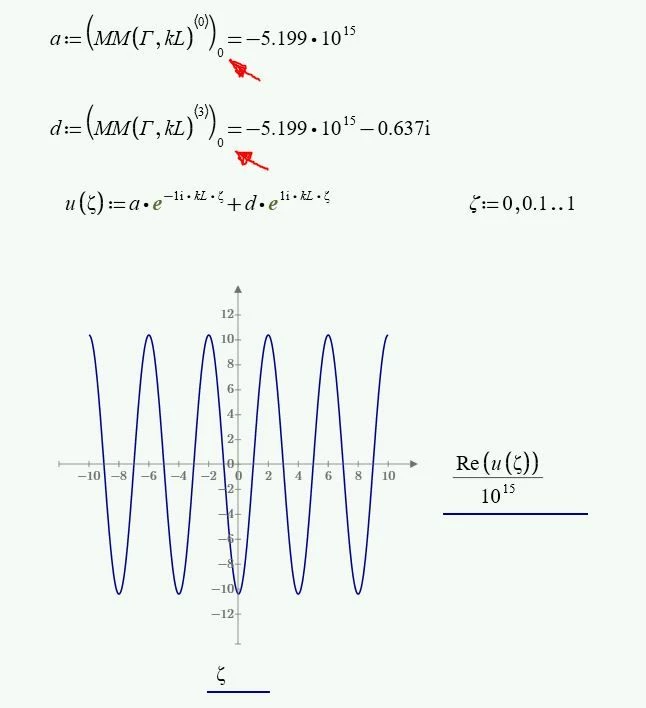
Capture.JPG


2 replies

21-Topaz II
January 15, 2022

Hi,

Matrices of one element are formed as part of the calculations.

Capture2.JPG

Simply use the zero index to get a number for a and a complex number for d.

Capture.JPG


Ali_Ihsan1-VisitorAuthor
1-Visitor
January 15, 2022

Thanks a lot. I understand now. If may ask, how do I modify the graph to change the number of ticks, labels, legend,s etc. the plot bar seems quite limited.

25-Diamond I
January 15, 2022

@Ali_Ihsan wrote:

Thanks a lot. I understand now. If may ask, how do I modify the graph to change the number of ticks, labels, legend,s etc. the plot bar seems quite limited.


Yes, Primes native plots are very limited. There is no option for showing grids, labels or legends.
But, while not obvious, you can change the first, second and last value for each axis and so you can at least control the number of ticks.


Another option is to use the third party plot component (chart component) which PTC had (quite badly) integrated into Prime since vers version 5 instead of improving their own native plots. This component is rather slow and un-intuitive, does not support units and has its scaling problems with certain combinations of screen resolution and Windows zoom factor. But it supports a secondary y-axis, labels and legends (I think) and the display of grid lines.
So you may want to give it a try and see if it fits your need better than the native 2D-plot.

25-Diamond I
January 15, 2022

You used the column selector to access the individual elements of the 1 x 4 matrix calculated by MM(Gamma,kL).

Werner_E_0-1642247831232.png

That way you always get a column, a matrix, even if its only one row high (1 x 1 matrix).


You should rather use normal matrix indices

Werner_E_1-1642247879259.png

or you may also assign the output of MM(Gamma,kL) to a 4 x 1 matrix of individual variables:

Werner_E_2-1642247946938.png


Ali_Ihsan1-VisitorAuthor
1-Visitor
January 15, 2022

This work as well. I understand the underlying issue now. Thanks a lot. I appreciate the help.