1-Visitor
January 25, 2018
Solved

Issue with the inequality symbol

  • January 25, 2018
  • 2 replies
  • 2188 views

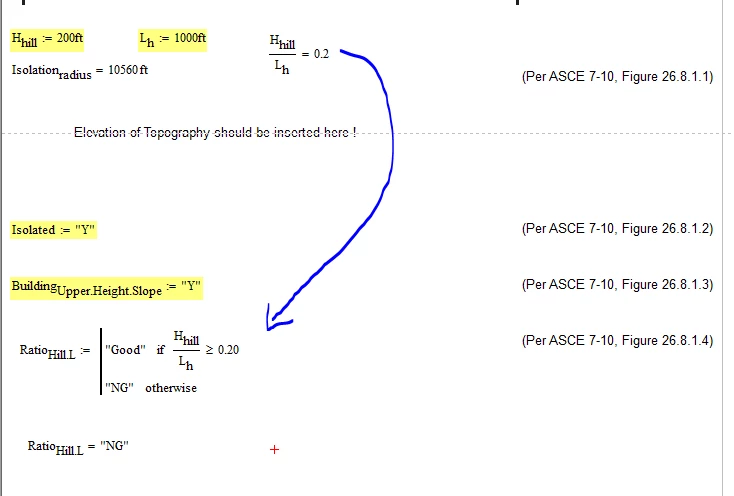
I created an if function for one of my equations and when I plug in the equal value as a solution, it does not recognize it as a correct value even though the inequality symbol shows that it has to be. Mathcad issue.PNG
Best answer by MJG

Because of how computers store numbers, Mathcad actually calculates H/L to be 0.19999999999999998.  Since this is slightly under 0.2, the if statement returns "NG".

To alleviate this, uncheck the option "use exact equality for comparisons and truncation" under Tools -> Worksheet Options -> Calculation

2 replies

23-Emerald I
January 25, 2018

Under menu "Tools/Worksheet options," on the calculation tab, uncheck "use exact equality for comparisons and truncation"

MJG1-VisitorAnswer
1-Visitor
January 25, 2018

Because of how computers store numbers, Mathcad actually calculates H/L to be 0.19999999999999998.  Since this is slightly under 0.2, the if statement returns "NG".

To alleviate this, uncheck the option "use exact equality for comparisons and truncation" under Tools -> Worksheet Options -> Calculation

jenny291-VisitorAuthor
1-Visitor
January 25, 2018

Thank you for the clarification!

12-Amethyst
February 4, 2018

Instead of changing worksheet options, another possibility I believe is robust is to avoid the use of specific numeric entries in inequalities. Instead of typing 0.20 in the Ratio program inequality, define a named constant (e.g., RefRatio:=Hhill/Lh) and use RefRatio in the inequality.


Lou
