
1-Visitor
November 19, 2015
Solved

Kirchoff - solve block Prime

  • November 19, 2015
  • 8 replies
  • 3224 views

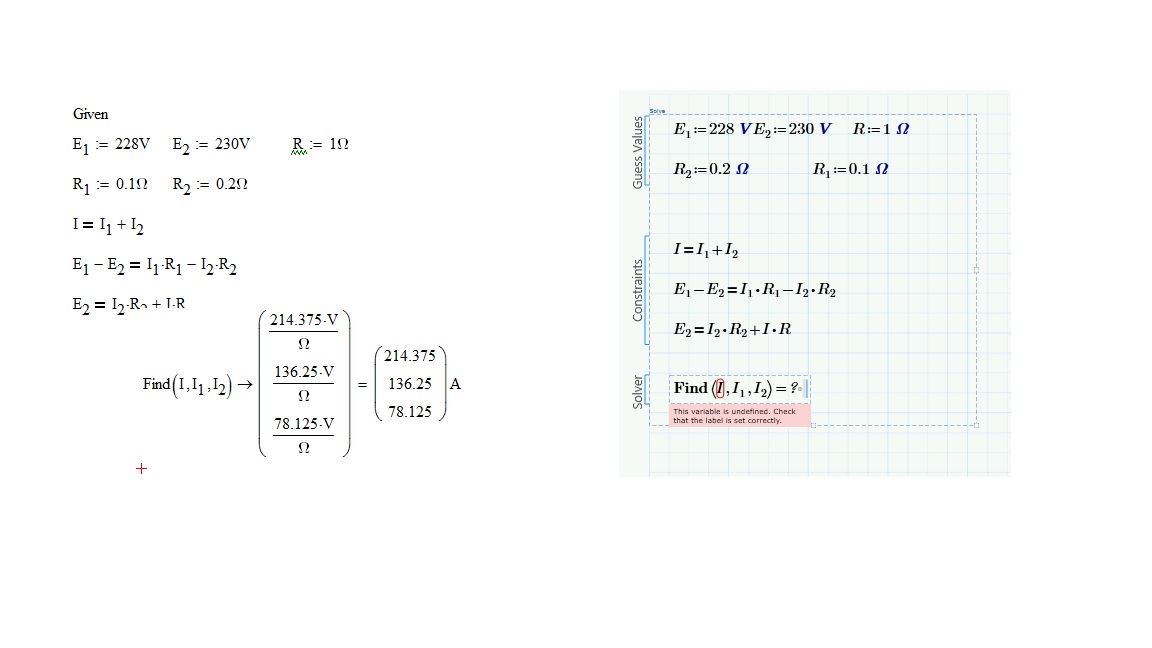
In MathCad 14 it was no problem using solve combined with Kirchoff laws on a circuit to figure out different current, but in MathCad Prime it doesn't work when i type the same things in solve block.

What am I doing wrong?

MathCad 14 on the left and Prime on the right
Kirchoff.jpg

8 replies

1-Visitor
November 19, 2015

Firstly can you provide a worksheet as it is difficult to determine the issue from an image.

However, it seems you are solving symbolically in Mathcad and not in Prime. Is there a reason you are solving symbolically?

Mike

1-Visitor
November 19, 2015

I have just used the method that i have been tought one my Nspire.

19-Tanzanite
November 19, 2015

In MC 15 (left panel) you are using a symbolic solve, which does not require guesses for the variables you wish to solve for. In Prime (right panel) you are using a numeric solve, which does require guesses. Either use a symbolic solve, or add guess values for the currents.

You should also get rid of the first equation. Given I1 and I2 it's trivial to calculate I after the solve block.

Lastly, Prime includes a converter that will convert MC 15 worksheets to Prime worksheets. That saves you the work of retyping everything, and also avoids the possible errors associated with doing that.

24-Ruby IV
November 19, 2015
24-Ruby IV
November 19, 2015

Thanks for the correct answer!

The book Elrctrical Engineering studies with Excel, Mathcad and Internet is in costraction!

1-Visitor
November 19, 2015

Arh know I can see it... Those guess values are totally misunderstood by me. It works know. But I can't see the idea of theses guess values?  Can anyone explain it to med?

1-Visitor
November 19, 2015

I suggest you read up on Solve Blocks in the help menu.

Mike