

1-Visitor
November 30, 2014
Solved

large number of inputs

  • November 30, 2014
  • 1 reply
  • 2275 views

Hello All,

My program receives models information from an Excel file and performs the calculations and returns some results as the outputs.

when I run the program for large number of input models (300 models for example), the final result is different from individual calculation by the same program.

I have repeated this several times. The results of individual calculations are always the same, the results of large number of models are always the same but they don't match.

Is there something about Mathcad that I should consider for large number of calculation? or the problem is in the program itself?
Best answer by AndyWesterman

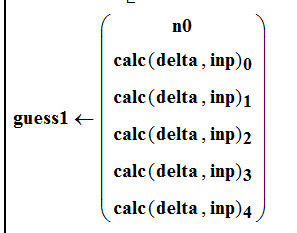
on a different topic, I would recommend not calling the same subroutine, multiple times.

Capture.PNG

This will call the same subroutine 5 times,

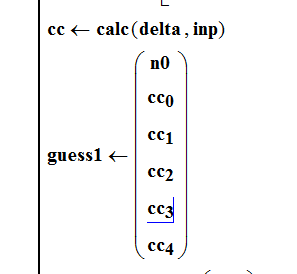
replacing it with

Capture.PNG

will only call the subroutine once & therefore reduce the time to complete one calculation cycle.

making changes as attached has reduced the time for one calculation from ~73 seconds to ~7 seconds.

There will be more instances of this but it shows what is possible.

I don't think that this will affect the calculations that you are making but you will need to verify that this is true

Regards

Andy

PS: changing the value of i in the "for i " loop isn't best practice either so I've changed that too.

1 reply

25-Diamond I
November 30, 2014

Hard to say without knowing what you are doing exactly. But I don't think that the number of calculation influences Mathcad's results. I rather guess its an error in the way you do the calculations or read in the data which by chance just shows in certain situations. I guess that not all calculations are wrong but just some beginning from a certain point!?

For example if you read in the data from your excel sheets and you do not initialize the matrix you read it in, ther may be values from a prior read be left because the new matrix should be smaller because you read less data.

payman1-VisitorAuthor
1-Visitor
December 1, 2014

Thank you Werner, as you mentioned the issue is probably from reading a large number of inputs .

what do you mean by "initialize the matrix " ? How can I remove this issue?

25-Diamond I
December 1, 2014

PAYMAN RAJAI wrote:

Thank you Werner, as you mentioned the issue is probably from reading a large number of inputs .

No, its not the number of input files. But the more calculations you make, the greater is the probability that a (hidden) error shows up.

what do you mean by "initialize the matrix " ? How can I remove this issue?

I am in the dark, I have no idea what you are doing as you don't attach a sheet. I don't know how you read your data, which data structure you use, who you accomplish the iteration over your many Excel data sheets, etc.

If you have a 3x3 matrix M and you assign four values M[0,0 to M[1,1, it will still be a 3x3 matrix. If you set M to a scalar, e.g. M:=0, before you assign the four values, you get a 2x2 matrix.