

Solved
Limitations of combo boxes, plots and chart components
I am trying to set up a worksheet something like this (full size image attached)
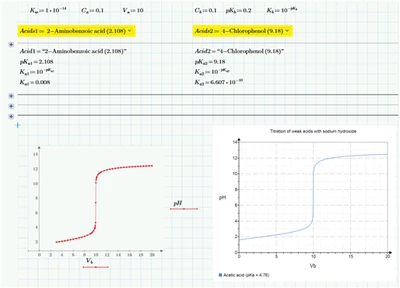
I have a number of issues which I don't think can be solved, and which mean that Mathcad is not the right tool for this particular project. However, I am posting this to see if anybody can persuade me otherwise.
- Firstly, the two combo boxes (each with the same 200+ rows) cannot be populated through code, only by pasting values or entering values manually, one by one. The source data for the combo boxes comes from two columns of an Excel workbook. For the time being I am only working with the first combo box. I have had help with this aspect but in my opinion Mathcad should have a way of populating a combo box via code.
- The idea is that when a different acid is selected from the combo box, the plot and/or chart component are automatically updated. This is working as far as the plots are concerned (i.e. both the native plot and the chart component automatically reflect the changed data)
- It does not seem possible to give the native plot a title that is bound to it (i.e. can move with the plot)
- All in all, the native plot to me is a waste of time ... I have seen other posts which demonstrate the hoops that need to be jumped through in order to display gridlines, for example
- The chart component is, at first, more promising but I would want to be able to set the chart title to a variable which I can set based on the various parameters displayed on the worksheet.
- Most importantly I would need the legend(s) to be able to be updated, by whatever means, when a different acid is selected. Perhaps, but not that I have found, by setting the legend text to a variable which changes when a different acid is selected..
Am I trying to use Mathcad as a hammer when what I really need is a screwdriver (or vice versa)?