5-Regular Member
November 26, 2024
Solved

Listbox save state Mathcad Prime 10

  • November 26, 2024
  • 3 replies
  • 4076 views

Does anyone know how to save the state of a listbox in Prime 10? I know how in v15, but cannot get it to work in Prime. When a worksheet is closed and reopened, the list boxes all reset to the top line, not the choice that was made. I agree a lot of improvements have been made with Prime, but this needs to be addressed. 

Best answer by Werner_E

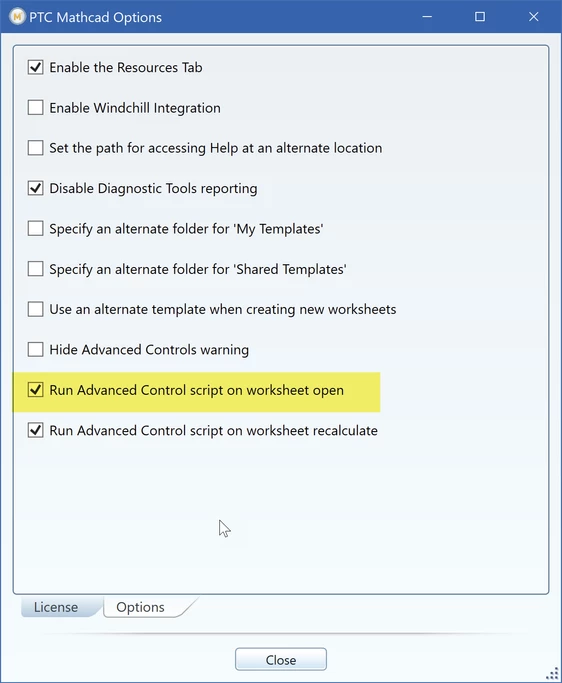
I could track it down to the highlighted  option.
Werner_E_0-1732725588433.png


If this option is checked, the listbox reverts to its first entry after reloading the worksheet.

@DJNewman  I guess that this option is not checked in your installation.


I we still may consider it a bug because when only the last option is checked (which it is by default, I think), the very same "Advanced Control script" is run on recalculation, but this time the option selected remains intact. So the highlighted option seems to do a bit more. So its either a bug or a defect in the documentation/option text which does not reveal all changes affected by that option.

EDIT: This was wrong!! When the last option is checked a Listbox with a modified script also falls back to option #1 when the sheet is recalculated.

So both options do the same, but the behaviour is different for a Listbox with an unmodified script and also different in different installations of Prime and so far its not clear why.


Probably its best to disable this option. After all the rest of the worksheet isn't recalculated on loading and we see a static view of the sheets state when it was saved. So it seems to be consistent if the scripts aren't run as well.
I guess this option is unchecked originally anyway and I seem to have it checked because I didn't know (and still don't) what it actually would be good for 😉

 

3 replies

DJNewman
18-Opal
November 26, 2024

I can't replicate your problem, and I'm using the default List Box code. I tried on both Mathcad Prime 10.0.0.0 and Mathcad Prime 10.0.1.0 and same thing.


I screen-recorded me trying to replicate your issue.


Edit: I can only replicate your issue if you don't save the worksheet before closing it, but...surely you're doing that?

PTC Marketer for Creo and Mathcad. I run their YouTube channels, some Creo campaigns, and all Mathcad campaigns and communications.
kprice5-Regular MemberAuthor
5-Regular Member
November 26, 2024

Interesting. No idea why mine is not cooperating. 

25-Diamond I
November 26, 2024

Does it also happen when you use the default Listbox out of the box - the one with options "one" "two" and "three".

Otherwise I only could imagine that you modified the script and have put something like " ListBox.CurSel(0);" in "function ListBoxEvent_Start(".

But if this is the case then the state would also be reset to the top entry when you let the sheet recalculate - does this happen in your sheet?

When you initially add a ListBox the function ListBoxEvent_Start usually is just empty.

kprice5-Regular MemberAuthor
5-Regular Member
November 27, 2024

If I use the default, and do not modify it, then it works as expected. However, if I change any of the text, like change "Two" to "Four", then it no longer works. Same with adding or removing a line. 


That was a very good question. 

25-Diamond I
November 27, 2024

Ah,  that's interesting!


I can confirm that I experience the very same effect as you. Simply editing the text lets Prime reset the selection to the first entry when the file is loaded.


As I guess that this behaviour is not as intended, I would say that you found a bug. Maybe @DJNewman  could confirm.


Werner_E25-Diamond IAnswer
25-Diamond I
November 27, 2024

I could track it down to the highlighted  option.

Werner_E_0-1732725588433.png


If this option is checked, the listbox reverts to its first entry after reloading the worksheet.

@DJNewman  I guess that this option is not checked in your installation.


I we still may consider it a bug because when only the last option is checked (which it is by default, I think), the very same "Advanced Control script" is run on recalculation, but this time the option selected remains intact. So the highlighted option seems to do a bit more. So its either a bug or a defect in the documentation/option text which does not reveal all changes affected by that option.

EDIT: This was wrong!! When the last option is checked a Listbox with a modified script also falls back to option #1 when the sheet is recalculated.

So both options do the same, but the behaviour is different for a Listbox with an unmodified script and also different in different installations of Prime and so far its not clear why.


Probably its best to disable this option. After all the rest of the worksheet isn't recalculated on loading and we see a static view of the sheets state when it was saved. So it seems to be consistent if the scripts aren't run as well.
I guess this option is unchecked originally anyway and I seem to have it checked because I didn't know (and still don't) what it actually would be good for 😉

 

kprice5-Regular MemberAuthor
5-Regular Member
November 27, 2024

I think you are on to something. Both of those buttons are checked on mine. I do find that if I uncheck the highlighted one, then it works as expected, it saves the selections. I have now discovered that I need to uncheck both of those, because if you click the "Calculate" button on the Calculation tab, it resets all the boxes. Not sure how it is working for everyone, but I have to hit this button every time I open a file that has reference file (Include in Prime 10). 

25-Diamond I
November 27, 2024

I can confirm that i experience the same effect. When the last option is set, a listbox which was edited in some way is reset to option #1 when the sheet is recalculated.

It seems that @DJNewman  does not experience the same problem as he has both options set.

Not sure what the difference may be.

Some guesses (just stabbing in the blue) are the original language - mine is German, his probably native US English.

Or maybe the OS? Mine is Win 10.