1-Visitor
October 21, 2022
Solved

loop and link

  • October 21, 2022
  • 2 replies
  • 3027 views

Hi, newbie here.

As now, in midst preparing the power cable ampacity calculation, somehow, required loop calculation process at the end section. Here it goes.

1) Assume the θsc (pic 1)

2) Then several calculation in the middle to get the ampacity value. (pic 2)

3) Once current (I) value obtained, the θsc required to be calculated as per red mark above. 

4) When θsc calculated, it required to be linked and to be used as input in item (1) above (and so on until) the θsc in item 1 and item 2 comes with 0 difference.

5) Calculation sheet as attached.


Thanks.

 

Best answer by Werner_E

OK, there are four calculations which depend on thetasc and you have to turn these into functons of thetasc.

Then you can use either a solve block or the "root" function to do the iterations for you:

Werner_E_0-1666623450120.png

Hope that the attached sheet helps.


Remarks:

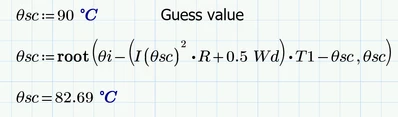
The root function can also be used without providing a range (I used 9°C to 90°C) but using a guess value:

Werner_E_1-1666623815955.png

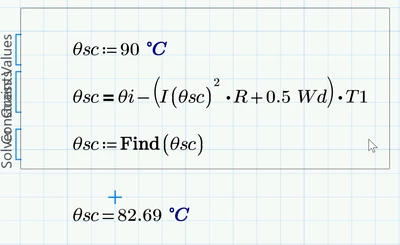
And her for completeness sake how to do it using a solve block

Werner_E_2-1666623869365.png


2 replies

23-Emerald IV
October 23, 2022

I think you are missing a term 'v', to be multiplied with each of the two T4 in your formula for I.


In order for an iteration you have to make clear which items depend on I and on theta_sc,


Success!
Luc


1-Visitor
October 24, 2022

Hi,


Already checked and the formula seem correct.

I tried through Xcel sheet, seem good since will automatically recalculate by loop/iteration.


Any idea for automated iteration setting instead of manual way in mathcad?

Here how it shall work... (some idea for you).

Red circle - guess/assumed value.

Then calculation process will use the red circle value to compute all the formula till green circle value obtained.

Then, green value shall be used in red circle for next round of computation until the red and green value difference approach zero.


Hope to hear from you soon.

AM_10463246_0-1666613319960.png


Werner_E25-Diamond IAnswer
25-Diamond I
October 24, 2022

OK, there are four calculations which depend on thetasc and you have to turn these into functons of thetasc.

Then you can use either a solve block or the "root" function to do the iterations for you:

Werner_E_0-1666623450120.png

Hope that the attached sheet helps.


Remarks:

The root function can also be used without providing a range (I used 9°C to 90°C) but using a guess value:

Werner_E_1-1666623815955.png

And her for completeness sake how to do it using a solve block

Werner_E_2-1666623869365.png


24-Ruby III
October 23, 2022

Please specify which version of Mathcad Prime your worksheet file is for.

25-Diamond I
October 23, 2022

The worksheet says its for P 8.0.0.0