
1-Visitor
Sep 3, 2014 5:23 PM UTC
Question

Math Formating complex number polar with degrees

Hello people,

I use Mathcad for college, and its a very usefull program.

About a week ago Tab "Math Formatting" is normal, but don't update sheet, see example:
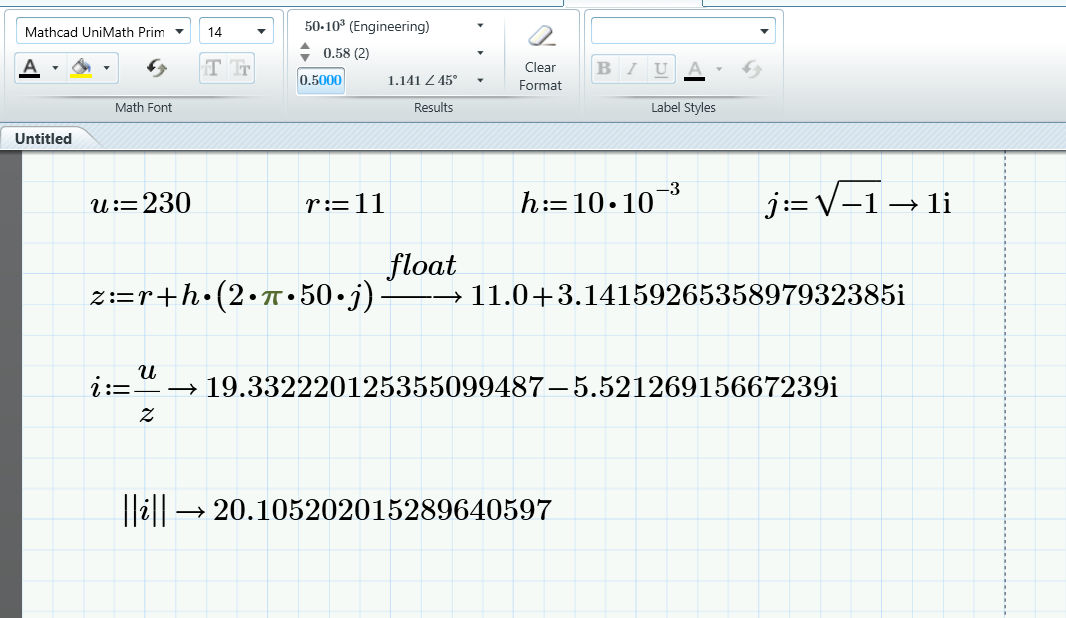
mathcad.PNG

I Start a new, then Tab Math Formatting, and choose like in piccture.

When i start make calculations, it never respect new Formatting.

I already have "repair", "uninstall" and "install" again.

One use is complex numbers, i choos to show in polar degrees, and it shows in rectangular, why?

Anyone has the same problem and was able to fix it?

Regards,

Luis Lourenço,

Portugal

4 replies

23-Emerald I
Sep 3, 2014 6:29 PM UTC

You're using symbolic evaluation. Does it do the same for numerical evaluations ( = instead of -->)?

Translate
19-Tanzanite
Sep 3, 2014 6:35 PM UTC

Good catch! It works for numeric evaluations, not for symbolic evaluations. If you click on a symbolic evaluation you do not even have the option of changing the formatting of the result.

Translate
19-Tanzanite
Sep 3, 2014 6:32 PM UTC

If the cursor is in an evaluation when you select the formatting it affects only that evaluation. To change the default formatting for the worksheet click on a blank area of the sheet, and then change it.

Translate