Solved

Werner_EAnswer
25-Diamond I
September 24, 2024
Formatting number only apply to numerical calculations done using Primes native numerical engine. This is what you get when you use the normal equal sign = to evaluate an expression.
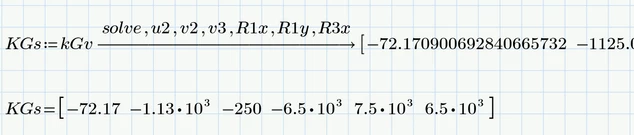
Symbolic evaluation is another beast. Its a third party software integrated into Prime, does not know anything about units and does not respect the number formatting you choose for numerical results.
By default the symbolics will give you 20 significant digits.
You can change this by using the modiefier "float,<n>", where <n> denotes the number of significant digits. But this is a double-edged sword because using "float" does not only affect the display of the result but also the precision of the whole calculation! So it should be used with great care and it works best if used for what is was made for - symbolical math using undefined variables..
If you can't avoid using it, you always can assign the result to a variable and then display it numerically using the format you want:
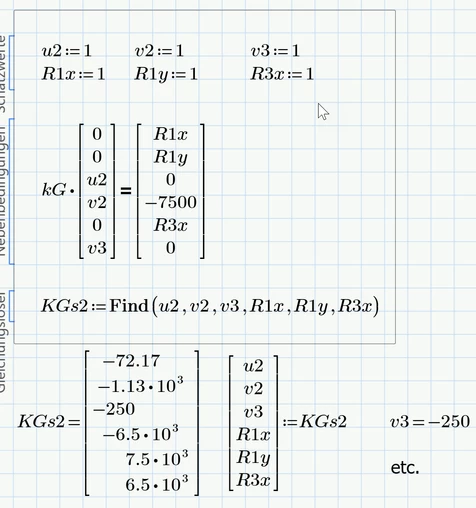
If no unknown undefined variables are in use as in case of your calculation, you may also use Primes numerical solve block to get the solution. The drawback is that it looks a bit ugly and you have to provide guess values.