
1-Visitor
May 4, 2015 7:54 PM UTC
Question

Mathcad 15 - Difficulty converting answer to decimal

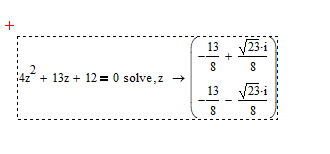
Hi - I have a solution to my problem which is :

However I want my answer in decimal form - I have tried highlighting the result and then Format, Result, Decimal but it didn't make any difference

Anybody got any suggestions please on this one ?

thanks,
7 replies

19-Tanzanite
May 4, 2015 8:25 PM UTC

The symbolic processor will give answers with only integers if the expression contains only integers. Change one or more of your numbers to decimal format (4.0, 13.0, 12.0).

Translate
ccoldham1-VisitorAuthor
1-Visitor
May 4, 2015 8:46 PM UTC

Thank you so much Richard

Translate
1-Visitor
May 4, 2015 11:52 PM UTC

Apart from using the symbolic keyword or forcing float mode by using a decimal point, you may assign the result a variable and evaluate that variable numerically or you also may follow the symbolic evaluation by a numeric one (inline eval)

FLoat.png

Translate
24-Ruby IV
May 5, 2015 3:57 PM UTC

Also, in this case, you can use the built-in symbolic function "float":

Pic_1.png

Translate
19-Tanzanite
May 5, 2015 5:02 PM UTC

Also, in this case, you can use the built-in symbolic function "float":

No! That is not correct. The float keyword does not just change the precision of the results. It changes the precision of the calculations, so "float 3" means you are doing extremely low precision floating point math.

Translate
24-Ruby IV
May 6, 2015 9:13 AM UTC

Richard,

In the screenshot I showed the possibility of using the symbolic operator "float", and only the user will determine the accuracy of the calculation which it requires (n = 3 - shows as a simple example).

Pic_2.png

Translate