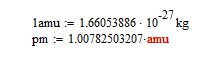
You have two typographical problems. First, immediately in front of the 10 is a space. I don't know how you got that, but it means Mathcad thinks <space>10 is a variable. The second one is really bizarre. I can't even figure out how to create it. Select the kg with the insertion point to the right. then delete the kg by backspacing, and finally delete the multiplication operator. You will see that the entire expression is surrounded by parentheses: (amu:=1.66053886*10^27). So somehow it's grouped the LHS and the RHS. I don't know how to do that even if I wanted to  . It must be the result of some sequence of edits you did, probably involving the "1" that was originally on the LHS.
The solution is just to delete the entire expression and retype it.