
7-Bedrock
April 9, 2019
Solved

MathCAD 15 - Microsoft Forms 2.0 ComboBox

  • April 9, 2019
  • 1 reply
  • 2572 views

Hello,

We've been using MathCAD 15 for years and have many calc's made using Combo Boxes.  I recently upgraded my machine to Windows 10 and get errors when opening our programs.  We got a new computer for a new hire last year with Windows 10 and everything worked seamlessly.  I think I may have figured out the problem, but I have no idea how to solve it.  The ComboBox that we use is apparently the Microsoft Forms 2.0 ComboBox, it shows up as below on my co-workers MathCAD under the Insert Component.  However when I go to the same location the option for Microsoft Forms 2.0 ComboBox doesn't exist.  How do I load or install the Microsoft Forms 2.0 Objects?  I've searched online everywhere and can't find anything that works. 
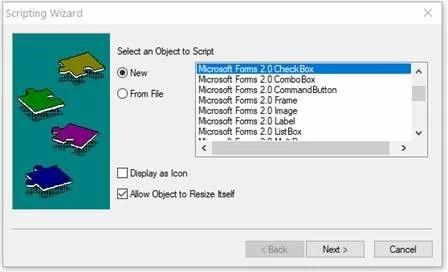
Combobox.jpg


Best answer by SteelEngineer

In case anyone else runs into this issue.  The problem was Microsoft Office being installed as 64 bit.  Re-installed it as 32 bit and everything is working fine.  

1 reply

SteelEngineer7-BedrockAuthorAnswer
7-Bedrock
April 9, 2019

In case anyone else runs into this issue.  The problem was Microsoft Office being installed as 64 bit.  Re-installed it as 32 bit and everything is working fine.  

16-Pearl
April 10, 2019

out of interest. my machine is running 64-bit and I can see the Microsoft Forms 2.0 ComboBox in the list of scriptable object !

23-Emerald IV
April 10, 2019
Your Windows may be 64 bit. Your Office probably is 32 bit (as is Mathcad 15).

Luc.