20-Turquoise
August 31, 2023
Solved

Mathcad 15 , Symbolic Evaluate ?

  • August 31, 2023
  • 2 replies
  • 3682 views

Hello Everyone.
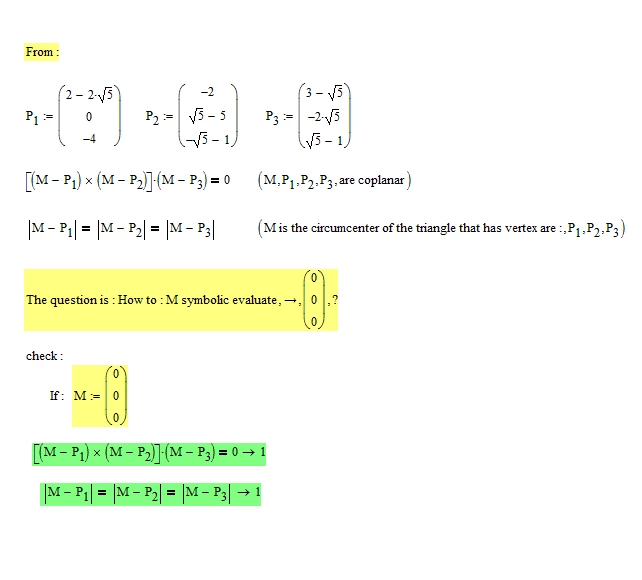
From :

Symbolic_Evaluate.PNG

Mathcad 15 , How to : M , Symbolic Evaluate ---> ?
Thanks in advance for your time and help.
Best Regards.
Loi.

Best answer by ttokoro

A=P1,B=P2,C=P3

image.png

2 replies

ttokoro
21-Topaz I
ttokoro21-Topaz IAnswer
21-Topaz I
August 31, 2023

A=P1,B=P2,C=P3

image.png

t.t.
lvl10720-TurquoiseAuthor
20-Turquoise
August 31, 2023

  I greatly appreciate your time and help. Many, many, many thanks, Ttokoro. 🤔 🙄. I got it :

I.png

   The reason that I need help with this question is the following :

1.PNG

   Best Regards.

     Loi.

25-Diamond I
August 31, 2023
  • Your "Minimize" command is only minimizing the function f which calculates the distance from O to P. You should not be surprised that the result is the point P (or a point close to it within the set numerical precision)
    If you want the other yellow equations seen as constraints you have to create a solve block by adding "Given" in front of it.
    Furthermore its advisable to decrease the value of CTOL
  • The functions of @ttokoro you try to use to draw the arc are not suitable for real Mathcad. Mathcad does not provide the row selector which ttokoro used (you can't just replace it for the column selector as you did) and Mathcads 3D plot does not accept NaN's in the data values.
    Furthermore in the other thread ttokoro used 101 point for the linePS, you are only creating 11 points. So obviously you can't use a loop from 0 to 101!
    The programs for PSline and Cline have to be rewritten to suit the specifics of Mathcad which are different from Prime. 
    And although the 3D plot in Prime is extremely poor and far inferior to that in Mathcad, the ability to use NaN's and also the simpler data structure to plot a curve is a significant improvement over Mathcad (as is the introduction of the row selector).
    Conclusion: PTC did an incredible amount wrong, but not everything 😉

BTW, as already mentioned in the other thread - ttkoros way to plot the arc will fail if the arc angle is equal to or greater than 180 degree. Furthermore the points created to represent the arc are not equally spaced - points in the middle of the arc are farther apart. Using enough points can hide that effect efficiently, though.


Werner_E_0-1693476375424.png


23-Emerald IV
August 31, 2023

Here's your problem, symbolically solved in Mathcad 11:

LucMeekes_0-1693514208142.png

(The symbolic answer is several pages wide and probably will not show in Mathcad 15)

Now with the given points P1...P3 I get your desired result:

LucMeekes_6-1693516015288.png


That's as close as numerical non-zero gets to 0.

But I can fill in arbitrary numbers, such as:

LucMeekes_7-1693516041249.png

or

LucMeekes_8-1693516063492.png


Success!
Luc


lvl10720-TurquoiseAuthor
20-Turquoise
August 31, 2023

  I save your ***.mcd into ***.xmcd . And I think your MC11-engine is more powerful than my MC15-engine in this case. :

L.PNG 

  Best Regards.

      Loi.