
14-Alexandrite
March 8, 2018
Solved

Mathcad 15 to prime expression

  • March 8, 2018
  • 2 replies
  • 3484 views

Hi

I'm newbie in Mathcad, I try to resolve a geometrical problem (vector analisys).

I have a paper with mathcad 15 expression which solve my problem.

But, I don't achieve to rewrite it in Prime, i don't find character and function

Do you have an idea ?

See it in Mathcad 15 :
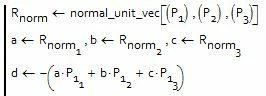
img.JPG


Best answer by Fred_Kohlhepp

Or you could just start typing

2 replies

23-Emerald I
March 8, 2018

If you have the sheet in 15, and you have Prime and 15 on your computer, you may convert the sheet to Prime:

Open Prime, at the top the second tab is input/output  Select the converter

Capture.PNG

You'll get a dialog box steer to your Mathcad 15 file, and convert it.  A file of the same name appears beside the old file that can be opened in Prime.

23-Emerald IV
March 8, 2018

What is the function 'normal_unit_vec' supposed to do?

How are P1 through P3 defined?

Do you realize that the default array and matrix indexing starts at 0 (rather than 1)?


Please attach your Mathcad15 sheet, as well as your attempt in Prime.

You may have to zip it/them first. A serious bug in this forum often prevents from attaching a mathcad file. In Windows Explorer click with the right-mouse button on the mathcad file and select 'Send to' -> 'Compressed (zipped) folder'. The resulting .zip file can be attached.


Success!
Luc

XDN14-AlexandriteAuthor
14-Alexandrite
March 8, 2018

thanks for your answer.

But i don't have original mathcad 15 file ...

I have a paper only


normal_unit_vec is define upstream, it's OK for this

yes it's Ok for matrix indexing start at 0


But my problem is a syntax,

I don't find to write

Rnorm1,Rnorm2, Rnorm 3  ?

Img_4.JPG

Img_3.JPG


img_2.JPG


23-Emerald I
March 8, 2018

To create a literal subscript in Prime, the key combination is "cntrl -" 


To create an index subscript, "[" (by itself.)