1-Visitor
July 29, 2019
Solved

mathcad "acos" giving an imaginary angle, please help ?

  • July 29, 2019
  • 2 replies
  • 3243 views

Dear all,


I am using the direction cosines to find angle (or rather, the change in angle) along a curve at specific points. 

But when the first part is a straight line, the change in angle should be zero (cos(theta) = 1.000) but mathcad is giving me cos(theta) = 1.00000000000000000000000000000000000000000000000001 or something and because of this, when I use the "acos" function, I am getting imaginary angles. 

Currently I just added a 10^-20 to the denominator and the problem seemed to go away (maybe). But is there any way I can avoid this altogether ?


The calculation sheet is attached below. Please dont mind the extreme decimal values for the "y" variables. I am reading them from a curve and so they are like that :).


Many thanks in advance !


Warm Regards,

Aravind.

Best answer by Werner_E

Here are four ways to deal with this round-off error:

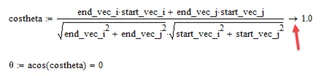
1) use symbolic calculation, follow the costheta expression by a symbolic eval

B1.png

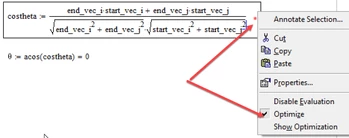
2) use symbolic calc, right click the expression and chose "Optimize"

B2.png

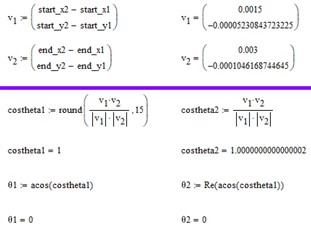
3) Round the result of costheta to just 15 decimals (guess this is the approach which directly addresses the problem)

4) Only use the real part of the angle

B.png


2 replies

23-Emerald IV
July 29, 2019

I understand that you use a formula to calculate cos(theta). When calculating numerically, you ALWAYS have to deal with uncertainty.

A 1 is a 1, but when it comes from e.g. 9 * (1/3)^, it might result in something slightly different from 1, due to internal representation of numbers.

To limit the result between -1 and 1, you could use:

cos_theta:=min( max( -1, expression), 1)

Where 'expression' is the formula you use to calculate cos(theta).


Success!

Luc

adnn1-VisitorAuthor
1-Visitor
July 29, 2019

That would work just fine.


Thanks LucMeekes ! It's a shame I can't mark two answers as solutions 🙂

Werner_E25-Diamond IAnswer
25-Diamond I
July 29, 2019

Here are four ways to deal with this round-off error:

1) use symbolic calculation, follow the costheta expression by a symbolic eval

B1.png

2) use symbolic calc, right click the expression and chose "Optimize"

B2.png

3) Round the result of costheta to just 15 decimals (guess this is the approach which directly addresses the problem)

4) Only use the real part of the angle

B.png


adnn1-VisitorAuthor
1-Visitor
July 29, 2019

Hi Werner,


Thanks for the multiple solutions 🙂